<?xml version="1.0" encoding="utf-8"?>
<feed xmlns="http://www.w3.org/2005/Atom">
  <title><![CDATA[Hongwei Qin's Blog]]></title>
  <subtitle><![CDATA[Share with the World]]></subtitle>
  <link href="/atom.xml" rel="self"/>
  <link href="http://qinhongwei.com/"/>
  <updated>2019-08-06T03:19:33.362Z</updated>
  <id>http://qinhongwei.com/</id>
  
  <author>
    <name><![CDATA[Hongwei Qin]]></name>
    <email><![CDATA[qhw12@mails.tsinghua.edu.cn]]></email>
  </author>
  
  <generator uri="http://zespia.tw/hexo/">Hexo</generator>
  
  <entry>
    <title><![CDATA[为什么人人都应该学一点机器学习]]></title>
    <link href="http://qinhongwei.com/2018/06/24/why-you-should-learn-some-machine-learning/"/>
    <id>http://qinhongwei.com/2018/06/24/why-you-should-learn-some-machine-learning/</id>
    <published>2018-06-24T05:09:47.000Z</published>
    <updated>2019-01-04T13:46:31.933Z</updated>
    <content type="html"><![CDATA[<h3 id="选专业很随机的"> 选专业很随机的 </h3>
<p> 一早起来看到老乡群里讨论 702 分的市探花，想起红博士十年前高考的小故事，有些戏剧性。没有多少事情能经历一年的考验，何况十年，十年过去，都是过眼云烟了。</p>
<p> 红博士有个特点，高考写作文会手抖。写语文作文手抖，写英文作文也手抖。虽然他留下了 70 分钟的时间写英文作文，还是手抖。红博士写英文作文会先在草稿纸上写好，再誊抄到答题纸上，誊抄的时候会手抖。这一抖，英文作文就从平时的接近满分减 10 分，好在红博士答对了所有客观题。语文作文手一抖，也是比常规得分低了十几分。好在那年的数学和理综稍微有些难度，红博士还是保持了足够的优势，只比省状元低了十分左右。对答案估分的时候，发现一个神奇的规律，那年的英文选择题答案，全部都符合 ABCD 的规律，每 4 题都是一个 ABCD 的顺序调整，命题小组真是太任性了。</p>
<p> 估分后高中老师带着我们，驱车到郑州找到招生组下榻的酒店，招生组组长听完我的估分和志愿情况，说除了建筑和经管以外的专业基本没有问题。如今的清华招生办主任，在当年还是河南省的招生组组长。当年的红博士被奇怪的风气洗脑，一心想着建筑相关的专业，再不行就学信息类专业，自知不能选建筑，于是把土木工程放在了第一志愿，后面几个志愿填上计算机电子自动化等等。招生组的另外一位老师，我到清华自动化报到后又见到了，不免猜测是不是这个老师把我丢进了自动化系，不然为什么不是计算机和电子。。。又过了几年，认识了更多的人，还发现一堆复杂交错的渊源，世界真是太小了。</p>
<p> 到了大学以后，有一次跟辅导员聊起第一志愿是土木这件事。刘导畅快一笑：土木又土又木，咱们自动化才是清华大系:)</p>
<p> 自动化在社工、体育上是传统强系，在专业上也是强系，比如有最多的 IEEE Fellow 系友，有最多的部级以上干部等等。如今人工智能大热，在本科招生、研究生招生、甚至本校本科生进实验室上，自动化都成了最有优势的专业。</p>
<h3 id="怎么选专业不后悔？"> 怎么选专业不后悔？</h3>
<p> 选专业是个复杂的大问题，我们姑且不去讨论它。从清华毕业后，我接触到越来越多各个学校的学生和毕业生。专业优先还是学校优先这件事，有许许多多的可能性，没有针对性的结论都是不负责任的。从红博士的角度看，有一个大概的倾向：大学给学生提供的最重要的资源是眼界。通常来讲，经济越发达的城市、综合实力越强的学校、综合实力越强的专业，越能提供更大的眼界。比如，清华姚班为什么这么强？去年有一篇很好的文章分析，但本质上，无非是姚班给学生提供了更开阔的眼界。首先姚班从清华新生挑选了在某些方面最顶尖的一批学生组合在一起（这些学生本身就具备了更开阔的眼界，比如高中就开始去 Google 实习这种操作），交叉信息研究院提供顶尖的科研教学资源，最核心的当然还是人脉资源，实习、出国都有更大的眼界。即使如此，清华在科研上最优秀的学生也未必是姚班学生，因为大学四年里，清华还提供了无数的资源开阔学生的眼界，利用好这些资源的学生能够胜出。</p>
<p> 当然如果仅仅是科研，大学就损失了很多价值，大家高中毕业直接去念研究生就好了。大学里，好玩的事情太多了，好玩的社团，好玩的社工，好玩的体育，好玩的图书馆，好吃的食堂，好玩的实习，好玩的恋爱，好玩的山野，好玩的登山队，好玩的岩壁……</p>
<h3 id="后悔了也没关系，翻盘的机会一次又一次"> 后悔了也没关系，翻盘的机会一次又一次 </h3>
<p> 高考是个翻盘的好机会，通过上清华，你终于可以再也不用跟不喜欢的人在一起！！！有没有！！！（太腹黑了。。。</p>
<p> 读研究生也是个翻盘的好机会，搞 GPA 不行，可你科研好啊，搞 GPA 不行，可你颜值高啊，搞 GPA 不行，可你导师 Nice 啊！！！（太腹黑了。。。</p>
<p> 工作还是个翻盘的好机会，搞学术不行，可是你产品思维好啊，导师不 Nice，可是你公司领导 Nice 啊，实验室弱，可是你公司强啊！！！（太腹黑了。。。</p>
<p> 人到不惑还是个翻盘的好机会，当小弟不行，可你会当领导啊，当螺丝钉不行，可是你会当将军啊，金山不行，可是小米做的好啊！！！（雷布斯：黑人?.jpg</p>
<h3 id="要不要报人工智能专业？"> 要不要报人工智能专业？</h3>
<p> 专业的本质：利益平衡下的产物 </p>
<p> 个别学校，什么火就开个什么专业，于是大数据专业，人工智能专业，纷纷冒了出来。</p>
<p> 这一波人工智能的火热，主要原因是机器学习在互联网行业的广泛应用。它背后的技术，如矩阵分析、统计推断、数值分析、信号处理、自动控制、体系结构、软件工程等等，依然是传统专业的内容，如自动化、计算机、电子、软件。它影响到的更多是研究生院的体系，也就是各实验室课题组的研究方向，跟本科生的培养关系很小。一个专业的发展，是要经过长时间的试错、调整的。</p>
<p> 不过，如今，每个人都应该懂一点机器学习。从变化中找到规律，这是一个伟大的学科。</p>
<p> 计算机视觉、语音识别和自然语言处理，是机器学习非常重要的三个应用领域。生活中的方方面面，已经受到机器学习带来的便利。传统学科重在解决某一项具体问题，而机器学习的角色则是一种工具。如果说编程的时代是软件 1.0， 则机器学习的时代则是软件 2.0。这也是为什么机器学习正不断地给传统行业带去改变。</p>
<p> 有一种思维叫程序员思维：任何重复性的工作，都应该程序化，让计算机完成。那么红博士要提一种机器学习思维：任何可以定义数据输入和标签输出的工作，都应该建立机器学习模型。</p>
<p> 最好的工程师都是造轮子的，机器学习就是一个轮子。如今机器学习可以帮助建造更好的司机、更好的医生、更好的金融分析师，将来的某一天也许能建造更好的科学家。</p>
<p> 加入造轮子行业的最好时机是十年前，其次是现在。</p>
]]></content>
    <summary type="html">
    <![CDATA[<h3 id="选专业很随机的"> 选专业很随机的 </h3>
<p> 一早起来看到老乡群里讨论 702 分的市探花，想起红博士十年前高考的小故事，有些戏剧性。没有多少事情能经历一年的考验，何况十年，十年过去，都是过眼云烟了。</p>
<p> 红博士有个特点，高考写作文会手抖。写]]>
    </summary>
    
  </entry>
  
  <entry>
    <title><![CDATA[2017 年终总结]]></title>
    <link href="http://qinhongwei.com/2018/01/01/2017review/"/>
    <id>http://qinhongwei.com/2018/01/01/2017review/</id>
    <published>2018-01-01T11:55:21.000Z</published>
    <updated>2018-01-01T12:32:05.865Z</updated>
    <content type="html"><![CDATA[<p>2017 年飞快地过去了，这一年的生活经历了巨大的改变。年轻人总是这样，生活是不可预测的，则充满乐趣。</p>
<h2 id="学业"> 学业 </h2>
<h3 id="博士毕业"> 博士毕业 </h3>
<p> 在导师的 push 下，终于按时完成博士论文撰写、送审，5 月份通过了博士学位答辩。整个博士论文环节中，深深感受到了清华为保证培养质量，而设下的种种关卡。为拿到博士学位，真是要过五关：开题答辩、中期答辩、预答辩、论文送审、最终答辩。这里面难度比较大的环节是开题答辩、中期答辩和论文送审。在写论文和答辩的过程中也算是系统地整理了研究课题，让其逻辑自洽，完整地探索了物体检测的三大难：速度、精度和尺度。在未来展望里，我总结了很多条研究方向。毕业后的半年，我居然真的带领实习生们把其中几个方向探索了一遍，出了不少成果。</p>
<h3 id="论文发表"> 论文发表 </h3>
<p>2017 年，一作的 CVPR 论文意外被拒。实习生的 Paper 意外接收，总算了却一桩心事。上半年忙于毕业，没能专注地做什么事情，ICCV 也没有什么收获。本质原因还是早已对 Paper 看淡了。不过后半年暑期实习的实习生们，算法产品化后，顺便投搞了几篇到 CVPR2018。他们都是第一次写 CVPR。看着他们收获满满地完成完整的科研训练，非常欣慰。</p>
<h2 id="工作"> 工作 </h2>
<h3 id="带领团队"> 带领团队 </h3>
<p> 带领团队，包含人才培养和算法攻关两部分。去年的计划里，有一条是带出一支有战斗力的团队。在毕业后 All in 的后半年，看起来是实现了一部分。一个实习生为主的团队，有很大的不稳定性，这跟算法快速迭代的需求是矛盾的。实习生管理的学问非常大，2018 年应该会更加游刃有余。新的一年全职员工数量也会快速增长，会带来新挑战。</p>
<h3 id="新算法"> 新算法 </h3>
<p> 今年的算法研究跟产品走得更近了，算法突破了一些长期瓶颈。新算法的研究上也实现了突破。总体看，非常成功。</p>
<h3 id="产品"> 产品 </h3>
<p> 算法从服务器往前端移，AI 云 +AI 端的战略，得到了业内普遍认同。在这样的机遇里，我们率先推出了低成本高性能产品。产品落地，卓有成效。</p>
<h2 id="生活"> 生活 </h2>
<h3 id="搬家"> 搬家 </h3>
<p> 从 15 分钟自行车程换到了 22 分钟车程的地方，从合租换成了整租。家里更加宽敞舒适了。多亏了各种米家产品，净化器、加湿器、净水器、台灯、空调伴侣、人体传感器，以及还没拆封的烟雾传感器、天然气传感器和智能马桶盖。。让家里更加舒适了。打印机、LG Ultrafine 4K 显示器，Magic keyboard 和 Trackpad 也让家里的办公环境更加舒适。</p>
<h3 id="长居北京"> 长居北京 </h3>
<p> 今年一个非常出乎意料的决定，就是没有定居深圳。尽管我们都对深圳充满了热爱，但北京的人才吸引力，还是大过了生活质量的需求。意外的是，今年冬天，北京的空气质量居然出奇地好。后来，想明白了，也许生活本身就不该是确定的。喜欢深圳这个城市，也许仅仅是因为在那里长期生活过呢？回答这个问题，唯一的办法就是做更多尝试。</p>
<h3 id="周游世界"> 周游世界 </h3>
<p> 今年是出差的转折点，以前喜欢到处跑，如今如果能待在家里，何苦要奔波呢？</p>
<p> 旅行，则不一样。完全放松的旅行，是生活重要的一部分。抓住学生时代的最后一点闲散时间，完成了新疆徒步的愿望，见识了北疆美轮美奂的大草原，草原的人和美景。路上，我们还遇到一条不知道从哪儿跑来的狗，一直跟了我们好多天，我们给它起名来福，加上小豆子和小莲子，就组成了阿尔卑斯山上的少女。</p>
<h3 id="电子产品"> 电子产品 </h3>
<p>Apple Watch Series 3 增加了电话功能，芯片性能也提升不少，体验非常好，现在可以两天充一次电了。</p>
<p>iPhone X 的 OLED 屏幕很舒服，人脸解锁还挺靠谱，多亏了今年冬天没怎么戴口罩。</p>
<p>iPad Pro 除了屏幕大了一些，配上 Apple Pencil 可以写写画画。但实际使用率还是比较低。新鲜感一过，就跟旧的 iPad 一起落灰了。</p>
<p>Kindle Oasis 2 换了七寸屏幕，实际体验大了很多，读起来可以少翻很多页，并没有感觉很重，握持手感也很好，自动调节亮度的功能不错。相比 Oasis 一代，最大的好处是非常接近纸质书了。</p>
<h3 id="健身大计"> 健身大计 </h3>
<p> 今年健身房去的少了很多，夏天回清华游了几次泳，很多时候一天下来最大的运动量居然是通勤的自行车或者步行。</p>
<p> 冬天到了，又新购置了跑步的装备，周末去奥森跑步体验不错。以后要成规律才行。</p>
<h3 id="谈婚论嫁"> 谈婚论嫁 </h3>
<p> 趁着国庆长假，参加了本科舍友的婚礼，其实是全程吃喝玩乐的贵阳多日游，结束以后又新成了一对儿，现在天天在朋友圈秀恩爱。离开贵阳，和爸妈一起去 xhh 家里，又是几天吃喝玩乐。有了婚姻，两个本来完全没有关系的大家庭，突然亲密起来，想想真是人类社交中的一大乐事。婚礼是父母亲的，生活则是两个新人的。身边的朋友慢慢都结婚了，希望我们都能在经营感情上越来越成熟。</p>
<h2 id="2018 年想做的事">2018 年想做的事 </h2>
<ol>
<li> 创造更有利于个体成长的环境，提升团队合力 </li>
<li> 亲自指导 12 个实习生，其中本科生不低于一半 </li>
<li> 做一款爆品，并找到下一个实实在在的落地场景 </li>
<li> 一次长距离徒步 </li>
<li> 骑车 + 游泳 + 跑步 + 周末登山常态化 </li>
<li> 填补旅行空白省份：云南、湖南、内蒙 </li>
<li> 做更多回馈 DeepLearning 社区的公益 </li>
<li> 做一件回馈实验室的事情 </li>
<li> 带爸妈去一趟大草原 </li>
<li> 完成一次英语演讲 </li>
</ol>
<p> 很多人问题我的团队在做的事情，团队名字叫前端计算（有的叫边缘计算），这里的前端是相对服务器后端而言的。在深度学习算法比较慢的时候，必须跑在服务器上。但随着神经网络加速技术发展、专用芯片和通用芯片的计算能力提升、隐私和处理速度需求、数据中心成本限制，深度学习的计算需要放在设备上进行，这就是前端计算。这里的挑战非常大，需要算法又快又好，还要与设备深度配合。算法方面，我们覆盖大规模视频理解和深度学习相关的基础技术。我们一直在招人，全职和实习都可，我的邮箱是“姓名全拼 @公司域名”。希望你踏实勤奋，coding 能力强，喜欢做研究或者做算法到产品的转换。</p>
]]></content>
    <summary type="html">
    <![CDATA[<p>2017 年飞快地过去了，这一年的生活经历了巨大的改变。年轻人总是这样，生活是不可预测的，则充满乐趣。</p>
<h2 id="学业"> 学业 </h2>
<h3 id="博士毕业"> 博士毕业 </h3>
<p> 在导师的 push 下，终于按时完成博士论文撰写、送审，5]]>
    </summary>
    
  </entry>
  
  <entry>
    <title><![CDATA[阳台山-凤凰岭-龙泉寺一日徒步路线]]></title>
    <link href="http://qinhongwei.com/2017/04/13/Yangtai-Fenghuang-Hiking/"/>
    <id>http://qinhongwei.com/2017/04/13/Yangtai-Fenghuang-Hiking/</id>
    <published>2017-04-13T08:44:31.000Z</published>
    <updated>2017-04-13T11:18:41.000Z</updated>
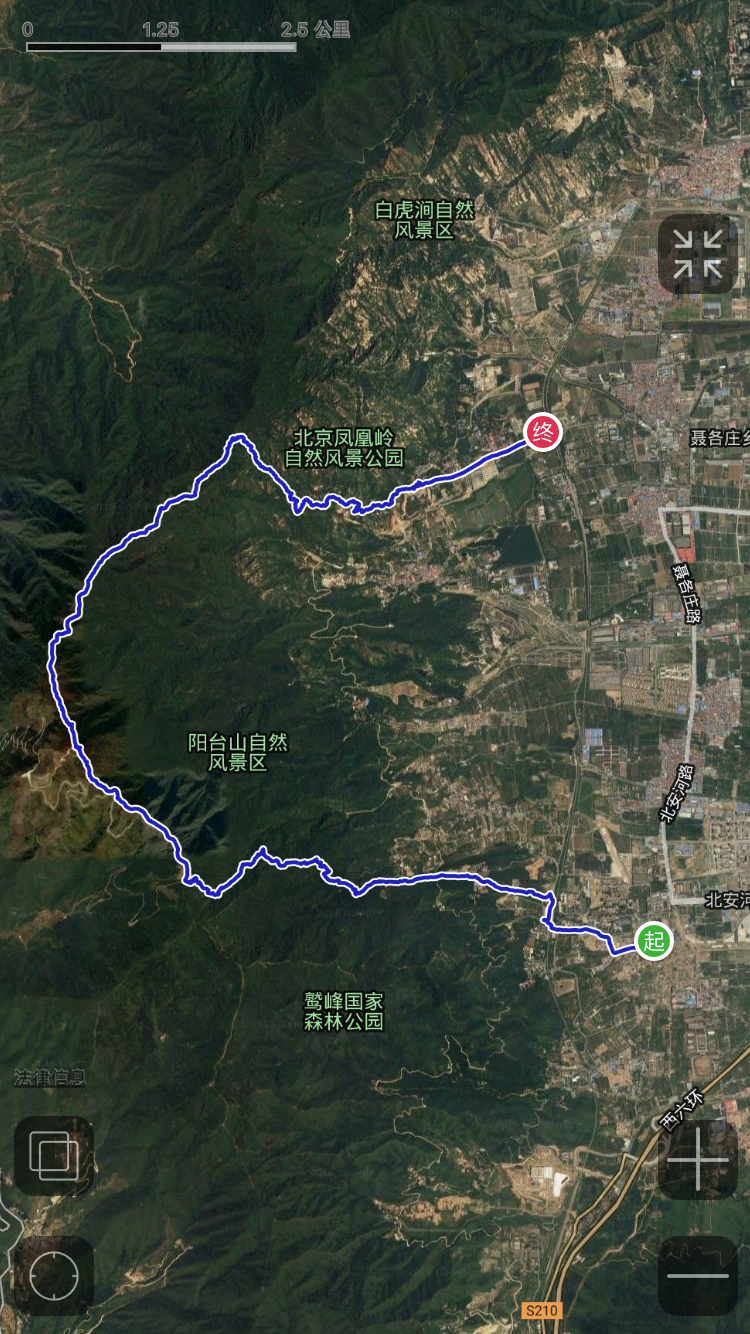
    <content type="html"><![CDATA[<p> 春游登山计划 </p>
<h3 id="天气"> 天气 </h3>
<p>2017.4.15, 多云,13-27℃</p>
<h3 id="时间安排"> 时间安排 </h3>
<p><strong>8:00</strong> 包车出发 <br><strong>9:00</strong> 到达阳台山自然风景区门口 <br><strong>10:00</strong> 到达金山寺 <br><strong>10:40</strong> 到达绿栅栏 <br><strong>11:30</strong> 到达观景台 <br><strong>12:30</strong> 到达山顶 <br><strong>13:00</strong> 向凤凰岭进发 <br><strong>15:00</strong> 开始下撤 <br><strong>17:00</strong> 到达龙泉寺 <br><strong>17:30</strong> 到达凤凰岭景区出口 <br><strong>18:00</strong> 上车返程 <br><strong>19:00</strong> 到达市区吃饭 <br><a id="more"></a></p>
<h3 id="地图"> 地图 </h3>
<h4 id="路线图"> 路线图 </h4>
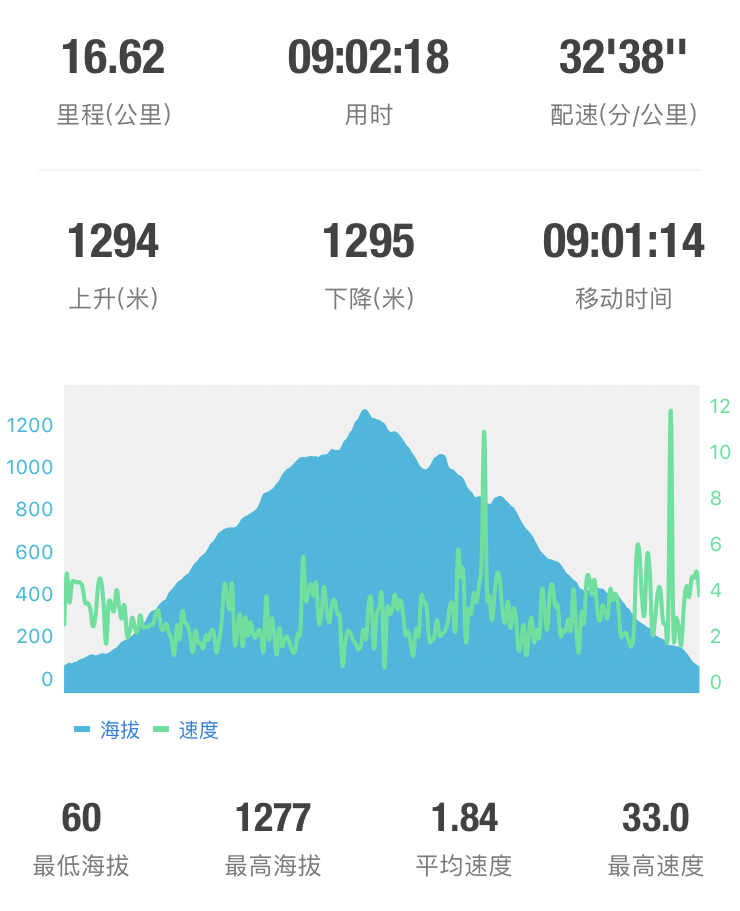
<p><img src="/image/IMG_1680.PNG" alt="路线卫星图"><br><img src="/image/IMG_1681.PNG" alt="全程上升下降"><br><img src="/image/IMG_1682.PNG" alt="路线描述"></p>
<h3 id="线路强度"> 线路强度 </h3>
<h4 id="难度"> 难度 </h4>
<p> 中等 ★★★☆☆</p>
<h4 id="路况"> 路况 </h4>
<p> 土路、台阶路、石头路 </p>
<h3 id="活动费用"> 活动费用 </h3>
<ul>
<li> 阳台山门票 10 元 </li>
</ul>
<h3 id="个人装备"> 个人装备 </h3>
<ul>
<li><p> 衣物 </p>
<blockquote>
<p> 适合户外运动。推荐排汗 T 恤，加一个薄外套。）</p>
</blockquote>
</li>
<li><p> 鞋 </p>
<blockquote>
<p> 登山鞋（推荐）/ 运动鞋（高帮）</p>
</blockquote>
</li>
<li> 零钱 </li>
<li> 身份证 </li>
<li> 卫生纸 </li>
<li> 垃圾袋 </li>
<li> 登山杖（推荐）</li>
<li> 其它如雨伞或雨衣、相机、口哨、指北针、小刀等个人酌情配 </li>
</ul>
<h3 id="食品药品"> 食品药品 </h3>
<ul>
<li> 早餐自行解决，一定要吃早餐，保证体力 </li>
<li> 自带午餐一份 </li>
<li> 纯水 <code>1.5L</code></li>
<li> 功能性饮料、运动饮料、零食若干（比如巧克力、士力架、牛肉干、 糖、水果）</li>
<li> 个人所需的特殊药品自备 </li>
</ul>
<h3 id="注意事项"> 注意事项 </h3>
<ul>
<li> 准时到达不迟到，不等人 </li>
<li> 安全，如遇到身体不适或特殊情况及时向队长反映 </li>
<li> 活动中听从队长安排，不擅自行动 </li>
<li> 行动时保持队型不能擅自离开队伍，保持 2 人同行原则，不得超过领队，不落后于收队 </li>
<li> 注意环保，不乱扔垃圾 </li>
</ul>
]]></content>
    <summary type="html">
    <![CDATA[<p>春游登山计划</p>
<h3 id="天气">天气</h3>
<p>2017.4.15, 多云,13-27℃</p>
<h3 id="时间安排">时间安排</h3>
<p><strong>8:00</strong> 包车出发<br><strong>9:00</strong> 到达阳台山自然风景区门口<br><strong>10:00</strong> 到达金山寺<br><strong>10:40</strong> 到达绿栅栏<br><strong>11:30</strong> 到达观景台<br><strong>12:30</strong> 到达山顶<br><strong>13:00</strong> 向凤凰岭进发<br><strong>15:00</strong> 开始下撤<br><strong>17:00</strong> 到达龙泉寺<br><strong>17:30</strong> 到达凤凰岭景区出口<br><strong>18:00</strong> 上车返程<br><strong>19:00</strong> 到达市区吃饭<br>]]>
    
    </summary>
    
      <category term="outdoor" scheme="http://qinhongwei.com/tags/outdoor/"/>
    
  </entry>
  
  <entry>
    <title><![CDATA[2016年终总结]]></title>
    <link href="http://qinhongwei.com/2016/12/31/2016-review/"/>
    <id>http://qinhongwei.com/2016/12/31/2016-review/</id>
    <published>2016-12-31T10:50:08.000Z</published>
    <updated>2016-12-31T12:46:47.000Z</updated>
    <content type="html"><![CDATA[<p> 在清华大学交换学习的小威，来自美国波士顿。前天一起吃午饭，我给他讲起一个成语，叫“白驹过隙”。意思是时间像骏马飞奔而过地面上的缝隙一样。虽然以他的中文背景未必能参透这个成语的精妙之处，但我们关于时间飞逝的感受也许是相似的。他不久就要回到波士顿继续读大学，而我也要开启新的一年。</p>
<p>2016 年里，大部分事情的发展都超出了我的预料，有些惊喜，有些震惊，有些彷徨。人工智能作为年度热词，就像 Nvidia 的股价一样，一路飙升。</p>
<h2 id="观点"> 观点 </h2>
<h3 id="人工智能"> 人工智能 </h3>
<p> 圈外的评论家们今天说人工智能是炒作，明天说人类要阻止人工智能。而在圈内，以深度学习、对抗学习、强化学习为代表的技术正突飞猛进，不断在产品层面落地。上亿人的人脸比对技术，前端相机上的实时人脸检测跟踪技术，强化学习驱动的智能相册人脸聚类，人脸布控疑犯抓捕系统，视觉感知驱动的驾驶辅助系统，在我看得见的范围内不断发生。</p>
<p>2012 年 7 月，博士入学前，我第一次听说深度神经网络，在 768 创意产业园的一个深度学习读书会。彼时的深度学习已经在语音识别上实用，不久之后 NIPS 大会上，Hinton 及其弟子发布 ImageNet 图像识别比赛冠军解决方案，深度卷积神经网络，其影响一直到今年，热度从未减退。这五年，正好是我的博士生涯，我是幸运的一代。在浪潮之巅，才看得清哪里是朝阳，哪里是余晖。</p>
<p>2016 年，拉斯维加斯，奢华之城。CVPR 盛会上，深度学习占据了多半领域。我第一次在 CVPR 上展示论文，用深度学习实现的快速而准确的人脸检测现场演示，吸引了大量围观人群。而我新开发的人脸检测算法，其速度之快，精度之高，再过几天就要在 2017 年拉斯维加斯的 CES 上由 Nvidia 在他们的无人驾驶芯片上展示。</p>
<h3 id="技术与产品"> 技术与产品 </h3>
<p> 这两年毕业了大量的博士生，然而在工业界的发展却是大相径庭。一个人的发展，首先要靠自我奋斗，但也要考虑历史的进程。人工智能技术的落地，首先要考虑刚需。什么是刚需？我认为有两点，开源和节流。人工智能技术创造的价值，一定是从这两个方向去考虑的，意淫出来的商业模式撑不起独角兽的市值。其次，科学家离商业模式还有很多环，商务、销售、产品、研发，任何一环散了，事情就做不好。</p>
<h3 id="做事与做人"> 做事与做人 </h3>
<p> 几天前，峰瑞资本总结 Google 入华十年留下了什么。讲的是留下的 50 各 Google 员工的发展。看完他们的故事，我想，一个人无论什么时候，一定要在朝阳产业里做核心的职位。在年轻的时候，周围必须是一群最优秀的人。如果这样的条件满足了，那就看自己的本事以及老板的诚意吧。人生短暂，与志同道合的人共事。</p>
<h2 id="学术故事"> 学术故事 </h2>
<p> 这一年发生了很多的小事，也认识了很多的人，见识了许许多多的人和事。有圈子，就有故事，有故事就有八卦。见到了很多大人物、小人物。在圈子里待久了，就能见到很多事情的发生和发展。</p>
<h2 id="周围的人"> 周围的人 </h2>
<p> 年底了，导师评上了教授，是实验室的大好事。博士二年级的时候，我在一封回给老师的邮件里，说期望两件事情，一是做脚踏实地的研究，二是看博士期间看到导师评上教授。如今至少第二个愿望实现了，回顾往事，感慨无限。</p>
<p> 我的学术 mentor 大神事业一帆风顺，回想起一年多以前，并肩写代码的经历，也是感慨颇多。他优秀的领导才华、敏锐的技术判断和舍我其谁的担当，创造了可观的价值，培养了一支极富战斗力的团队。他佩服的是技术大神，我想在这个时代，这个愿望比他的偶像会更快地实现。</p>
<p> 我的朋友大部分过的都不错，我祝福他们。</p>
<h2 id="生活"> 生活 </h2>
<ul>
<li> 这一年忙忙碌碌，消瘦了一些，主要是因为饭太难吃了，实在吃不下。很多时候休息不够，健身坚持的不并不好。</li>
<li> 去了趟武夷山和婺源，然而似乎都太匆忙。</li>
<li> 无法适应校园的生活了，太安逸。</li>
<li> 经济大环境不好，投资收益为负。</li>
<li> 电子产品都是小孩子的游戏，我拥有几乎所有的最新产品，却带不来更多的满足感。穷的身无分文的时候，凑钱买的第一个 iPad，是最满足的时候。超前的消费观才能带来满足。</li>
</ul>
<h2 id="未来"> 未来 </h2>
<p> 到了找工作的年纪，并没有去找工作，然而大环境太好，导致无数的猎头找上门来。确定的几家 offer，都声称是他们给出的最高的级别和薪酬期权包，也都自以为是市场上最有竞争力的 offer。一个人的发展，首先要靠自我奋斗，但也要考虑历史的进程。上大舞台，干大事业，这是清华几十年来的就业定律。我常常想，这个大舞台到底是什么？<br> 一年以前，我从未想到今天的 AI 格局，等到明年，一切也未必会尘埃落定。</p>
<h2 id="2017 年想做什么？">2017 年想做什么？</h2>
<ul>
<li> 带出一支富有战斗力的团队 </li>
<li> 拓展知识领域 </li>
<li> 川西徒步、自驾 </li>
<li> 学编曲 </li>
<li> 健身圆环达标每周 3 天 </li>
<li> 投资收益 5%+</li>
</ul>
]]></content>
    <summary type="html">
    <![CDATA[<p> 在清华大学交换学习的小威，来自美国波士顿。前天一起吃午饭，我给他讲起一个成语，叫“白驹过隙”。意思是时间像骏马飞奔而过地面上的缝隙一样。虽然以他的中文背景未必能参透这个成语的精妙之处，但我们关于时间飞逝的感受也许是相似的。他不久就要回到波士顿继续读大学，而我也要开启新的一]]>
    </summary>
    
  </entry>
  
  <entry>
    <title><![CDATA[建立你的私有云存储]]></title>
    <link href="http://qinhongwei.com/2016/08/28/build-your-own-Cloud/"/>
    <id>http://qinhongwei.com/2016/08/28/build-your-own-Cloud/</id>
    <published>2016-08-28T10:26:13.000Z</published>
    <updated>2016-08-28T11:07:41.000Z</updated>
    <content type="html"><![CDATA[<p> 今天推荐 ownCloud, 一个建立私有云存储的工具。</p>
<h2 id="为何要用私有云"> 为何要用私有云 </h2>
<p> 最好用的云存储服务是 Dropbox，这点大家公认。然而在我天朝，Dropbox 访问常常受限，配合翻墙工具使用尚可接受，但仍有不便之处，比如在翻墙工具不稳定或者分享文件给别人的时候。同理，Google Drive 也有这个问题。<br> 国内以百度云为首的一批云服务则以不可信任著称，重要文件还是算了。<br><a href="https://owncloud.org" target="_blank" rel="external">ownCloud</a> 作为一款开源工具，可以跨多平台使用，服务端可以部署在 linux 主机上，客户端则支持 Linux, macOS, Windows, iOS 以及 Android, 当然还可以像其他云服务一样从网页端访问。 可谓一款全平台工具。</p>
<h2 id="ownCloud 部署 Tips">ownCloud 部署 Tips</h2>
<p> 部署的细节，官网查询即可。这里分享几个 tips.</p>
<h3 id="域名映射"> 域名映射 </h3>
<p> 需要准备好一台有固定 ip 的 linux 主机。本质上 ownCloud 是作为一个网站服务，同时可以文件同步。部署好以后是按照 ip 地址访问的。就像部署网站一样，可以做域名映射，比如将 <a href="http://xxx.xxx.xxx.xxx/ownCloud" target="_blank" rel="external">http://xxx.xxx.xxx.xxx/ownCloud</a> 这样难记的地址映射到 <a href="http://drive.example.com" target="_blank" rel="external">http://drive.example.com</a> . 这样非常好记的地址。</p>
<h3 id="SSL 加密">SSL 加密 </h3>
<p> 部署好以后，建议做 SSL 加密，需要一个证书，通常证书是被某些公司垄断的，需要像域名一样按年付费购买。证书按照安全性需求分为几个等级，安全性要求越高就越贵，比如支付场景。也可以自己生成 SSL 证书，但是因为未认证，所以访问你的网址的时候，浏览器会提示不安全。如果你经常通过 ownCloud 分享文件给别人的话，遇到小白可能会困扰。做好 SSL 加密以后，你的云服务地址就变成了 <a href="https://drive.example.com" target="_blank" rel="external">https://drive.example.com</a> . </p>
<h3 id="账号管理"> 账号管理 </h3>
<p>ownCloud 设定好以后可以建立多个账号，并分群组，所以你建好的私有云可以给你的好友开通账号。这样每个人使用的体验跟常见云服务是差不多的。</p>
<h3 id="存储空间"> 存储空间 </h3>
<p> 有了 ownCloud 私有云，存储空间就只跟你的 Linux 主机存储空间大小有关了。如果你之前购买过 VPS，直接在 VPS 上设置是最稳定的了。对了，Digital Ocean 的 VPS 可以单独购买 SSD 存储空间了。如果不够用了，按需购买就行了。Digital Ocean 还是非常稳定的。(Digital Ocean 应该给我广告费:-))</p>
<p>Enjoy.</p>
]]></content>
    <summary type="html">
    <![CDATA[<p> 今天推荐 ownCloud, 一个建立私有云存储的工具。</p>
<h2 id="为何要用私有云"> 为何要用私有云 </h2>
<p> 最好用的云存储服务是 Dropbox，这点大家公认。然而在我天朝，Dropbox 访问常常受限，配合翻墙工具使用尚可接受，但仍有不便之]]>
    </summary>
    
      <category term="tech" scheme="http://qinhongwei.com/tags/tech/"/>
    
  </entry>
  
  <entry>
    <title><![CDATA[build your private cloud service]]></title>
    <link href="http://qinhongwei.com/2016/07/24/2016/build%20your%20private%20cloud%20service/"/>
    <id>http://qinhongwei.com/2016/07/24/2016/build your private cloud service/</id>
    <published>2016-07-24T09:13:00.000Z</published>
    <updated>2016-08-28T11:17:31.000Z</updated>
    <content type="html"><![CDATA[<h2 id="Who_needs_a_private_cloud?">Who needs a private cloud?</h2>
<p>Today let’s talk about how to build private cloud.<br>Public cloud service like Google Drive and Dropbox are blocked in China mainland. And the local services like Baidu Yun and others are very unreliable.</p>
<h2 id="How_to_build_one?">How to build one?</h2>
<p>Use an open source tool <a href="https://owncloud.org" target="_blank" rel="external">ownCloud</a>.</p>
<h3 id="Tips">Tips</h3>
<p>Choose a domain name.<br>Use SSL.<br>Build you ownCloud on your VPS.<br>Create accounts for your friends.</p>
]]></content>
    <summary type="html">
    <![CDATA[<h2 id="Who_needs_a_private_cloud?">Who needs a private cloud?</h2>
<p>Today let’s talk about how to build private cloud.<br>Public cloud se]]>
    </summary>
    
  </entry>
  
  <entry>
    <title><![CDATA[Set VPN server of L2TP/IPSec on Ubuntu 14.04]]></title>
    <link href="http://qinhongwei.com/2016/07/17/set-vpn-server-of-L2TP-IPSec/"/>
    <id>http://qinhongwei.com/2016/07/17/set-vpn-server-of-L2TP-IPSec/</id>
    <published>2016-07-17T13:13:34.000Z</published>
    <updated>2016-07-17T14:46:14.000Z</updated>
    <content type="html"><![CDATA[<p>iOS 10 Public beta version does not support PPTP anymore for security consideration. In a previous blog, I’ve shown how to setup PP2P VPN server on Ubuntu 14.04. Now, let’s setup L2TP/IPSec VPN.</p>
<h2 id="Step_1:_Install_requirements">Step 1: Install requirements</h2>
<p>First change to <code>sudo</code> mode, because we’ll have to use sudo many more times.</p>
<figure class="highlight"><table><tr><td class="gutter"><pre><div class="line">1</div></pre></td><td class="code"><pre><div class="line"><span class="built_in">sudo</span> <span class="operator">-s</span></div></pre></td></tr></table></figure>

<p>then,</p>
<figure class="highlight"><table><tr><td class="gutter"><pre><div class="line">1</div></pre></td><td class="code"><pre><div class="line">apt-<span class="keyword">get</span> install openswan xl2tpd ppp lsof</div></pre></td></tr></table></figure>

<h2 id="Step_2:_Configure_firewall">Step 2: Configure firewall</h2>
<figure class="highlight"><table><tr><td class="gutter"><pre><div class="line">1</div></pre></td><td class="code"><pre><div class="line">iptables -<span class="keyword">t</span> nat -A POSTROUTING -<span class="keyword">j</span> SNAT --<span class="keyword">to</span>-<span class="keyword">source</span> %YOUR-SERVER-IP% -<span class="keyword">o</span> eth</div></pre></td></tr></table></figure>

<p>Here, please replace %YOUR-SERVER-IP% (remove % of course)<br>do the following to modify <code>/etc/sysctl.conf</code>:</p>
<figure class="highlight"><table><tr><td class="gutter"><pre><div class="line">1</div><div class="line">2</div><div class="line">3</div><div class="line">4</div><div class="line">5</div><div class="line">6</div><div class="line">7</div><div class="line">8</div><div class="line">9</div></pre></td><td class="code"><pre><div class="line"><span class="built_in">echo</span> <span class="string">"net.ipv4.ip_forward = 1"</span> |  tee <span class="operator">-a</span> /etc/sysctl.conf</div><div class="line"><span class="built_in">echo</span> <span class="string">"net.ipv4.conf.all.accept_redirects = 0"</span> |  tee <span class="operator">-a</span> /etc/sysctl.conf</div><div class="line"><span class="built_in">echo</span> <span class="string">"net.ipv4.conf.all.send_redirects = 0"</span> |  tee <span class="operator">-a</span> /etc/sysctl.conf</div><div class="line"><span class="built_in">echo</span> <span class="string">"net.ipv4.conf.default.rp_filter = 0"</span> |  tee <span class="operator">-a</span> /etc/sysctl.conf</div><div class="line"><span class="built_in">echo</span> <span class="string">"net.ipv4.conf.default.accept_source_route = 0"</span> |  tee <span class="operator">-a</span> /etc/sysctl.conf</div><div class="line"><span class="built_in">echo</span> <span class="string">"net.ipv4.conf.default.send_redirects = 0"</span> |  tee <span class="operator">-a</span> /etc/sysctl.conf</div><div class="line"><span class="built_in">echo</span> <span class="string">"net.ipv4.icmp_ignore_bogus_error_responses = 1"</span> |  tee <span class="operator">-a</span> /etc/sysctl.conf</div><div class="line"></div><div class="line"><span class="keyword">for</span> vpn <span class="keyword">in</span> /proc/sys/net/ipv4/conf/*; <span class="keyword">do</span> <span class="built_in">echo</span> <span class="number">0</span> &gt; <span class="variable">$vpn</span>/accept_redirects; <span class="built_in">echo</span> <span class="number">0</span> &gt; <span class="variable">$vpn</span>/send_redirects; <span class="keyword">done</span></div></pre></td></tr></table></figure>

<p>Apply the above change with </p>
<figure class="highlight"><table><tr><td class="gutter"><pre><div class="line">1</div></pre></td><td class="code"><pre><div class="line"><span class="title">sysctl</span> -p</div></pre></td></tr></table></figure>

<h2 id="Step_3:_Change_/etc/rc-local">Step 3: Change <code>/etc/rc.local</code></h2>
<figure class="highlight"><table><tr><td class="gutter"><pre><div class="line">1</div></pre></td><td class="code"><pre><div class="line"><span class="keyword">vim</span> /etc/rc.local</div></pre></td></tr></table></figure>

<p>Before the line <code>exit 0</code>, add the following line (remember to replace %YOUR-SERVER-IP%), to make sure the modifications still work after reboot:</p>
<figure class="highlight"><table><tr><td class="gutter"><pre><div class="line">1</div><div class="line">2</div></pre></td><td class="code"><pre><div class="line"><span class="keyword">for</span> vpn <span class="keyword">in</span> /<span class="keyword">proc</span>/sys/net/ipv4/conf/*; <span class="keyword">do</span> echo <span class="number">0</span> &gt; $vpn/accept_redirects; echo <span class="number">0</span> &gt; $vpn/send_redirects; done</div><div class="line">iptables -t nat -A <span class="type">POSTROUTING</span> -j <span class="type">SNAT</span> --to-source %<span class="type">YOUR</span>-<span class="type">SERVER</span>-<span class="type">IP</span>% -o eth+</div></pre></td></tr></table></figure>

<h2 id="Step_4:_Configure_Openswan_(IPSEC)">Step 4: Configure Openswan (IPSEC)</h2>
<figure class="highlight"><table><tr><td class="gutter"><pre><div class="line">1</div></pre></td><td class="code"><pre><div class="line"><span class="keyword">vim</span> /etc/ipsec.<span class="keyword">conf</span></div></pre></td></tr></table></figure>

<p>add the following in <code>conf setup</code> part</p>
<figure class="highlight"><table><tr><td class="gutter"><pre><div class="line">1</div><div class="line">2</div><div class="line">3</div></pre></td><td class="code"><pre><div class="line"><span class="setting">protostack=<span class="value">netkey</span></span></div><div class="line"><span class="setting">force_keepalive=<span class="value"><span class="keyword">yes</span></span></span></div><div class="line"><span class="setting">keep_alive=<span class="value"><span class="number">60</span></span></span></div></pre></td></tr></table></figure>

<p>add the following in the end of the file (remember to replace %YOUR-SERVER-IP%):</p>
<figure class="highlight"><table><tr><td class="gutter"><pre><div class="line">1</div><div class="line">2</div><div class="line">3</div><div class="line">4</div><div class="line">5</div><div class="line">6</div><div class="line">7</div><div class="line">8</div><div class="line">9</div><div class="line">10</div><div class="line">11</div><div class="line">12</div><div class="line">13</div><div class="line">14</div><div class="line">15</div><div class="line">16</div><div class="line">17</div><div class="line">18</div></pre></td><td class="code"><pre><div class="line">conn L2TP-PSK-noNAT  </div><div class="line">  <span class="variable">authby=</span>secret  </div><div class="line">  <span class="variable">pfs=</span>no  </div><div class="line">  <span class="variable">auto=</span>add  </div><div class="line">  <span class="variable">keyingtries=</span><span class="number">3</span>  </div><div class="line">  <span class="variable">rekey=</span>no  </div><div class="line">  <span class="variable">ikelifetime=</span><span class="number">8</span>h  </div><div class="line">  <span class="variable">keylife=</span><span class="number">1</span>h</div><div class="line">  <span class="variable">ike=</span>aes256-sha1,aes128-sha1,<span class="number">3</span>des-sha1</div><div class="line">  <span class="variable">phase2alg=</span>aes256-sha1,aes128-sha1,<span class="number">3</span>des-sha1</div><div class="line">  <span class="variable">type=</span>transport  </div><div class="line">  <span class="variable">left=</span>%YOUR-SERVER-IP%  </div><div class="line">  <span class="variable">leftprotoport=</span><span class="number">17</span>/<span class="number">1701</span>  </div><div class="line">  <span class="variable">right=</span>%any  </div><div class="line">  <span class="variable">rightprotoport=</span><span class="number">17</span>/%any</div><div class="line">  <span class="variable">dpddelay=</span><span class="number">10</span></div><div class="line">  <span class="variable">dpdtimeout=</span><span class="number">20</span></div><div class="line">  <span class="variable">dpdaction=</span>clear</div></pre></td></tr></table></figure>

<p>now, add the following line to <code>/etc/ipsec.secrets</code> (remember to replace %YOUR-SERVER-IP% and your-password):</p>
<figure class="highlight"><table><tr><td class="gutter"><pre><div class="line">1</div></pre></td><td class="code"><pre><div class="line"><span class="variable">%YOUR</span>-SERVER-IP% <span class="variable">%any</span>: PSK <span class="string">"your-password"</span></div></pre></td></tr></table></figure>

<p>now use</p>
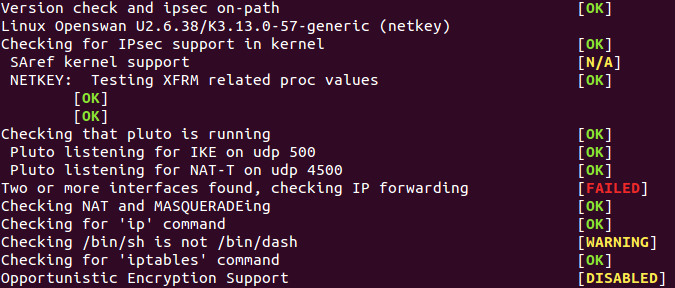
<figure class="highlight"><table><tr><td class="gutter"><pre><div class="line">1</div></pre></td><td class="code"><pre><div class="line"><span class="title">ipsec</span> verify</div></pre></td></tr></table></figure>

<p>to check errors, it may show something like this:<br><img src="/image/ipsec_verify.png" alt="ipsec verify"><br>The errors and warnings are okay. the <code>Failed</code> error is caused by an old perl version and can be ignored.</p>
<h2 id="Step_5:_Configure_xl2tp">Step 5: Configure xl2tp</h2>
<figure class="highlight"><table><tr><td class="gutter"><pre><div class="line">1</div></pre></td><td class="code"><pre><div class="line"><span class="keyword">vim</span> /etc/xl2tpd/xl2tpd.<span class="keyword">conf</span></div></pre></td></tr></table></figure>

<p>add the following lines to the end:</p>
<figure class="highlight"><table><tr><td class="gutter"><pre><div class="line">1</div><div class="line">2</div><div class="line">3</div><div class="line">4</div><div class="line">5</div><div class="line">6</div><div class="line">7</div><div class="line">8</div><div class="line">9</div><div class="line">10</div><div class="line">11</div><div class="line">12</div><div class="line">13</div><div class="line">14</div><div class="line">15</div><div class="line">16</div><div class="line">17</div></pre></td><td class="code"><pre><div class="line">[global]</div><div class="line">ipsec <span class="variable">saref =</span> yes</div><div class="line">saref <span class="variable">refinfo =</span> <span class="number">30</span></div><div class="line"></div><div class="line">;debug <span class="variable">avp =</span> yes</div><div class="line">;debug <span class="variable">network =</span> yes</div><div class="line">;debug <span class="variable">state =</span> yes</div><div class="line">;debug <span class="variable">tunnel =</span> yes</div><div class="line"></div><div class="line">[lns default]</div><div class="line">ip <span class="variable">range =</span> <span class="number">172.16</span>.<span class="number">1.30</span>-<span class="number">172.16</span>.<span class="number">1.100</span></div><div class="line">local <span class="variable">ip =</span> <span class="number">172.16</span>.<span class="number">1.1</span></div><div class="line">refuse <span class="variable">pap =</span> yes</div><div class="line">require <span class="variable">authentication =</span> yes</div><div class="line">;ppp <span class="variable">debug =</span> yes</div><div class="line"><span class="variable">pppoptfile =</span> /etc/ppp/options.xl2tpd</div><div class="line">length <span class="variable">bit =</span> yes</div></pre></td></tr></table></figure>

<p>now, create options.xl2tpd</p>
<figure class="highlight"><table><tr><td class="gutter"><pre><div class="line">1</div></pre></td><td class="code"><pre><div class="line"><span class="keyword">vim</span> /etc/ppp/<span class="keyword">options</span>.xl2tpd</div></pre></td></tr></table></figure>

<p>add the following:</p>
<figure class="highlight"><table><tr><td class="gutter"><pre><div class="line">1</div><div class="line">2</div><div class="line">3</div><div class="line">4</div><div class="line">5</div><div class="line">6</div><div class="line">7</div><div class="line">8</div><div class="line">9</div><div class="line">10</div><div class="line">11</div><div class="line">12</div><div class="line">13</div></pre></td><td class="code"><pre><div class="line">require-mschap-v2</div><div class="line">ms-dns <span class="number">8.8</span>.<span class="number">8.8</span></div><div class="line">ms-dns <span class="number">8.8</span>.<span class="number">4.4</span></div><div class="line">auth</div><div class="line">mtu <span class="number">1200</span></div><div class="line">mru <span class="number">1000</span></div><div class="line">crtscts</div><div class="line"><span class="keyword">hide</span>-password</div><div class="line">modem</div><div class="line">name l2tpd</div><div class="line">proxyarp</div><div class="line">lcp-<span class="keyword">echo</span>-interval <span class="number">30</span></div><div class="line">lcp-<span class="keyword">echo</span>-failure <span class="number">4</span></div></pre></td></tr></table></figure>

<p>now, add your VPN accounts:</p>
<figure class="highlight"><table><tr><td class="gutter"><pre><div class="line">1</div></pre></td><td class="code"><pre><div class="line"><span class="keyword">vim</span> /etc/ppp/chap-secrets</div></pre></td></tr></table></figure>

<p>each line is one account, you can add multiple lines:</p>
<figure class="highlight"><table><tr><td class="gutter"><pre><div class="line">1</div><div class="line">2</div><div class="line">3</div></pre></td><td class="code"><pre><div class="line"><span class="preprocessor"># Secrets for authentication using CHAP  </span></div><div class="line"><span class="preprocessor"># client server secret IP addresses  </span></div><div class="line">your_user_name l2tpd your_password *</div></pre></td></tr></table></figure>

<h2 id="Step_6:_Restart_the_services">Step 6: Restart the services</h2>
<figure class="highlight"><table><tr><td class="gutter"><pre><div class="line">1</div><div class="line">2</div></pre></td><td class="code"><pre><div class="line"><span class="class"><span class="keyword">service</span> <span class="title">ipsec</span> restart</span></div><div class="line">service xl2tpd restart</div></pre></td></tr></table></figure>

<h2 id="Client_configurations">Client configurations</h2>
<p>Take iOS 10 for example, choose L2TP, use your account and PSK<br>Enjoy.</p>
]]></content>
    <summary type="html">
    <![CDATA[<p>iOS 10 Public beta version does not support PPTP anymore for security consideration. In a previous blog, I’ve shown how to setup PP2P VPN]]>
    </summary>
    
      <category term="tech" scheme="http://qinhongwei.com/tags/tech/"/>
    
  </entry>
  
  <entry>
    <title><![CDATA[Secrets of PhD]]></title>
    <link href="http://qinhongwei.com/2016/06/05/nature-of-phd-1/"/>
    <id>http://qinhongwei.com/2016/06/05/nature-of-phd-1/</id>
    <published>2016-06-05T03:15:05.000Z</published>
    <updated>2016-06-16T15:45:21.000Z</updated>
    <content type="html"><![CDATA[<p> 博二之前，想对生活做加法; 博四以后，想对生活做减法。<br> 博士一年级，刚刚搬进宿舍的时候，买各种各样的物件，宿舍收拾地井井有条。现在，无论我怎么打扫宿舍，都不会比我当年的一半干净，而且我想扔掉所有能够重新买到的东西。<br> 好庆幸不用在同一个园子生活九年, 以致于你所有的青春, 都绕着一片存在了一百年的小园子转。</p>
]]></content>
    <summary type="html">
    <![CDATA[<p> 博二之前，想对生活做加法; 博四以后，想对生活做减法。<br> 博士一年级，刚刚搬进宿舍的时候，买各种各样的物件，宿舍收拾地井井有条。现在，无论我怎么打扫宿舍，都不会比我当年的一半干净，而且我想扔掉所有能够重新买到的东西。<br> 好庆幸不用在同一个园子生活九年, 以致于]]>
    </summary>
    
  </entry>
  
  <entry>
    <title><![CDATA[Mac for Geek]]></title>
    <link href="http://qinhongwei.com/2016/05/22/mac-for-geek/"/>
    <id>http://qinhongwei.com/2016/05/22/mac-for-geek/</id>
    <published>2016-05-22T08:04:33.000Z</published>
    <updated>2016-06-16T15:45:21.000Z</updated>
    <content type="html"><![CDATA[<p>昨天在 MacBook 上配了几个平时在 Ubuntu 工作机和服务器上用的工具，<code>Caffe</code>, <code>TensorFlow</code>, <code>gym</code>和 <code>opencv</code>.<br><code>Caffe</code> 可能是最麻烦的一个，装之前做了点功课。可是按照官方的安装指南，居然一个坑都没踩，就编译成功了。以后 CPU only 的 test demo 可以在 MacBook 上跑了，还是很方便的。<br><code>TensorFlow</code>纯 python 的环境，毕竟大公司出品，安装太容易了。<br><code>gym</code>也是 python 环境，安装就一条命令。<br><code>opencv</code>在装 <code>Caffe</code> 的时候就装好了。用 opencv 的官方 sample 跑了个摄像头人脸检测的 c++ demo.</p>
<p>对了，OSX 上的开发环境，有命令行工具就行了，根本不需要装 Xcode. 那些说要先装 Xcode 的都是误导啊。<br>记得我 MacBook 开箱第一件事是 g++ 编译一个 hello world 的 cpp 文件，它就提示我装一个命令行工具。装完开发环境就 OK 了。</p>
<p><code>iTerm</code>, <code>oh-my-zsh</code>, <code>homebrew</code>, <code>vimrc</code>, 纯 Unix 的环境体验。我的 MacBook 小白真是要啥有啥，配上高颜值，高清屏和不到一公斤的重量，真是一个完美的休闲工作机。<br>从 Win10 切到 OSX，感觉没有花费任何过渡时间，我直接就适应并沉迷于这个环境了。</p>
]]></content>
    <summary type="html">
    <![CDATA[<p>昨天在 MacBook 上配了几个平时在 Ubuntu 工作机和服务器上用的工具，<code>Caffe</code>, <code>TensorFlow</code>, <code>gym</code>和 <code>opencv</code>.<br><code>Caf]]>
    </summary>
    
      <category term="tech" scheme="http://qinhongwei.com/tags/tech/"/>
    
  </entry>
  
  <entry>
    <title><![CDATA[Buying new digital devices]]></title>
    <link href="http://qinhongwei.com/2016/05/08/buying-new-digital-devices/"/>
    <id>http://qinhongwei.com/2016/05/08/buying-new-digital-devices/</id>
    <published>2016-05-08T08:38:33.000Z</published>
    <updated>2016-06-16T15:45:21.000Z</updated>
    <content type="html"><![CDATA[<p>Yes, I did not bought new devices since a long time ago. Nothing exciting was created, and I need nothing more, I thought.<br>In the recent month, I bought three new toys.</p>
<ul>
<li>Kindle Oasis</li>
<li>MacBook</li>
<li>Apple Watch Band Milanese Loop</li>
</ul>
<h4 id="Kindle_Oasis_☆☆☆☆☆">Kindle Oasis ☆☆☆☆☆</h4>
<p>The last kindle I used is Kindle Paperwhite 2. It weights a little more than 200g. However, Kindle Oasis weights only a little more than 130g, which is lighter than iPhone 6s. The screen seems very close to real book, and I love it.</p>
<h4 id="MacBook_☆☆☆☆">MacBook ☆☆☆☆</h4>
<p>I use laptop for light office work and ssh.<br>I was using ThinkPad T440 with SSD and 8G CPU memory. It runs Win10 and I rely on MobaXterm to get unix experience. Everything seems OK, but not amazing. The screen is not high-resolution, with weak unix experience.<br>Apple just renewed MacBook, so I bought a silver item. It is light, very light. The keyboard is not so hard to adapt to. I love the full unix experience with <code>iTerm</code> and <code>oh-my-zsh</code>. The uniform experience with iPhone and iPad makes it better.</p>
<h4 id="Milanese_Loop_☆☆">Milanese Loop ☆☆</h4>
<p>The Apple Watch Milanese Loop feels really bad. It’s made of stainless steel and make me feel awkward when using metal MacBook. After two days, I began to use my sport band again.</p>
]]></content>
    <summary type="html">
    <![CDATA[<p>Yes, I did not bought new devices since a long time ago. Nothing exciting was created, and I need nothing more, I thought.<br>In the rece]]>
    </summary>
    
      <category term="devices" scheme="http://qinhongwei.com/tags/devices/"/>
    
  </entry>
  
  <entry>
    <title><![CDATA[Manage your research papers]]></title>
    <link href="http://qinhongwei.com/2016/05/08/manage-your-research-papers/"/>
    <id>http://qinhongwei.com/2016/05/08/manage-your-research-papers/</id>
    <published>2016-05-08T08:05:15.000Z</published>
    <updated>2016-06-16T15:45:21.000Z</updated>
    <content type="html"><![CDATA[<p>Today I recommend a tool for managing your papers that store in you mind. Mendeley, an all-platform tool for managing your references.</p>
<ul>
<li>It is web-based, and provide apps for <code>Mac OSX</code>, <code>Linux</code>, <code>Windows</code> and <code>iOS</code> and syncs your library across them.</li>
<li><p>It’s free for personal use with a limit of 2GB, which should be enough for most users.</p>
<blockquote>
<p>Pay if you need more storage or group cooperations.</p>
</blockquote>
</li>
<li><p>Another feature I love most is that it can analysis pdf files automatically.</p>
</li>
<li>Of course, you can highlight and annotate interesting sections and record your thoughts, and they are part of your library and will syncs across all your devices.</li>
<li>It is kind of academic searching engine itself. You can discover more or search by your knowledge.</li>
</ul>
<p>I won’t say Mendeley is the best one, but it’s much better than keeping everything in mind and downloading some paper every time you want to read it again:)</p>
]]></content>
    <summary type="html">
    <![CDATA[<p>Today I recommend a tool for managing your papers that store in you mind. Mendeley, an all-platform tool for managing your references.</p]]>
    </summary>
    
      <category term="academic" scheme="http://qinhongwei.com/tags/academic/"/>
    
  </entry>
  
  <entry>
    <title><![CDATA[How to install caffe on NVIDIA TX1]]></title>
    <link href="http://qinhongwei.com/2016/05/08/how-to-install-caffe-on-NVIDIA-TX1/"/>
    <id>http://qinhongwei.com/2016/05/08/how-to-install-caffe-on-NVIDIA-TX1/</id>
    <published>2016-05-08T06:25:51.000Z</published>
    <updated>2016-06-16T15:45:21.000Z</updated>
    <content type="html"><![CDATA[<p>Now you’ve get your new toy from the delivery man. Unbox your Jetson TX1 and attach a monitor and a keyboard.<br>You will see that your TX1 comes with Ubuntu 14.04.<br>Default Username and Passwd are: <code>ubuntu</code> and <code>ubuntu</code>.</p>
<ul>
<li>Install the package that comes with your TX1 in <code>~</code></li>
</ul>
<figure class="highlight"><table><tr><td class="gutter"><pre><div class="line">1</div><div class="line">2</div></pre></td><td class="code"><pre><div class="line"><span class="built_in">sudo</span> NVIDIA-INSTALLER/installer.sh</div><div class="line"><span class="built_in">sudo</span> reboot</div></pre></td></tr></table></figure>

<ul>
<li>Download and install cuda for TX1</li>
</ul>
<figure class="highlight"><table><tr><td class="gutter"><pre><div class="line">1</div><div class="line">2</div><div class="line">3</div><div class="line">4</div><div class="line">5</div><div class="line">6</div><div class="line">7</div></pre></td><td class="code"><pre><div class="line"><span class="built_in">sudo</span> dpkg -i cuda-repo<span class="operator">-l</span>4t-r23.<span class="number">1</span>-<span class="number">7</span>-<span class="number">0</span>-local_7.<span class="number">0</span>-<span class="number">71</span>_armhf.deb</div><div class="line"><span class="built_in">sudo</span> apt-get install cuda-toolkit-<span class="number">7</span>-<span class="number">0</span></div><div class="line"><span class="built_in">sudo</span> usermod <span class="operator">-a</span> -G video <span class="variable">$USER</span></div><div class="line"><span class="built_in">echo</span> <span class="string">"# Add CUDA bin & library paths:"</span> &gt;&gt; ~/.bashrc</div><div class="line"><span class="built_in">echo</span> <span class="string">"export PATH=/usr/local/cuda/bin:<span class="variable">$PATH</span>"</span> &gt;&gt; ~/.bashrc</div><div class="line"><span class="built_in">echo</span> <span class="string">"export LD_LIBRARY_PATH=/usr/local/cuda/lib:<span class="variable">$LD_LIBRARY_PATH</span>"</span> &gt;&gt; ~/.bashrc</div><div class="line"><span class="built_in">source</span> ~/.bashrc</div></pre></td></tr></table></figure>

<blockquote>
<p>If everything’s installed correctly, running ‘nvcc -V’ should give you a compiler version message.</p>
</blockquote>
<ul>
<li>Download and install opencv for TX1</li>
</ul>
<figure class="highlight"><table><tr><td class="gutter"><pre><div class="line">1</div></pre></td><td class="code"><pre><div class="line"><span class="built_in">sudo</span> dpkg -i libopencv4tegra-repo_2.<span class="number">4.12</span>.<span class="number">3</span>_armhf_l4t-r23.deb</div></pre></td></tr></table></figure>

<ul>
<li>Download and install cudnn for TX1<br>cudnn-7.0-linux-armv7-v3.0-prod.tgz</li>
</ul>
<figure class="highlight"><table><tr><td class="gutter"><pre><div class="line">1</div></pre></td><td class="code"><pre><div class="line"><span class="title">tar</span> -xvf cudnn-<span class="number">7</span>.<span class="number">0</span>-linux-armv7-v3.<span class="number">0</span>-prod.tgz</div></pre></td></tr></table></figure>

<p>The files are in <code>./cuda</code> now. Then copy the cudnn files into cuda path.</p>
<figure class="highlight"><table><tr><td class="gutter"><pre><div class="line">1</div><div class="line">2</div><div class="line">3</div><div class="line">4</div><div class="line">5</div><div class="line">6</div></pre></td><td class="code"><pre><div class="line"><span class="keyword">cd</span> cuda</div><div class="line">sudo <span class="keyword">cp</span> include/cudnn.<span class="keyword">h</span> /usr/local/cuda/include/</div><div class="line">sudo <span class="keyword">cp</span> lib/* /usr/local/cuda/lib/</div><div class="line"><span class="keyword">cd</span> /usr/local/cuda/lib/</div><div class="line"><span class="keyword">ln</span> -fs libcudnn.<span class="keyword">so</span>.<span class="number">7.0</span>.<span class="number">64</span> libcudnn.<span class="keyword">so</span>.<span class="number">7.0</span></div><div class="line"><span class="keyword">ln</span> -fs libcudnn.<span class="keyword">so</span>.<span class="number">7.0</span> libcudnn.<span class="keyword">so</span></div></pre></td></tr></table></figure>

<ul>
<li>Install caffe dependencies</li>
</ul>
<blockquote>
<p>This part is mostly the same with Caffe official installation guide for Ubuntu 14.04, except the <code>opencv</code>. You should be safe with the following guide, if not, please refer to <a href="http://caffe.berkeleyvision.org/install_apt.html" target="_blank" rel="external">Caffe official installation guide</a></p>
</blockquote>
<figure class="highlight"><table><tr><td class="gutter"><pre><div class="line">1</div><div class="line">2</div><div class="line">3</div><div class="line">4</div></pre></td><td class="code"><pre><div class="line">sudo <span class="built_in">add</span>-apt-repository universe</div><div class="line">sudo apt-<span class="built_in">get</span> <span class="keyword">update</span></div><div class="line">sudo apt-<span class="built_in">get</span> install libprotobuf-dev libleveldb-dev libsnappy-dev libhdf5-serial-dev protobuf-<span class="keyword">compiler</span></div><div class="line">sudo apt-<span class="built_in">get</span> install --<span class="keyword">no</span>-install-recommends libboost-<span class="keyword">all</span>-dev</div></pre></td></tr></table></figure>

<ul>
<li>Install atlas as blas</li>
</ul>
<figure class="highlight"><table><tr><td class="gutter"><pre><div class="line">1</div></pre></td><td class="code"><pre><div class="line">sudo apt-<span class="keyword">get</span> install libatlas-<span class="keyword">base</span>-dev</div></pre></td></tr></table></figure>

<p>or install OpenBLAS or MKL for better CPU performance.</p>
<ul>
<li>Install remain dependencies in ubuntu 14.04</li>
</ul>
<figure class="highlight"><table><tr><td class="gutter"><pre><div class="line">1</div></pre></td><td class="code"><pre><div class="line"><span class="built_in">sudo</span> apt-get install libgflags-dev libgoogle-glog-dev liblmdb-dev</div></pre></td></tr></table></figure>

<ul>
<li>Install caffe</li>
</ul>
<figure class="highlight"><table><tr><td class="gutter"><pre><div class="line">1</div><div class="line">2</div><div class="line">3</div><div class="line">4</div></pre></td><td class="code"><pre><div class="line">sudo apt-<span class="built_in">get</span> install -<span class="keyword">y</span> git</div><div class="line">git clone http<span class="variable">s:</span>//github.<span class="keyword">com</span>/BVLC/caffe.git</div><div class="line"><span class="keyword">cd</span> caffe</div><div class="line"><span class="keyword">cp</span> Makefile.config.example Makefile.config</div></pre></td></tr></table></figure>

<p>now compile caffe, remember Do NOT use all the cores by <code>make all -j</code>, or it hangs the system. Instead use the following.  </p>
<figure class="highlight"><table><tr><td class="gutter"><pre><div class="line">1</div></pre></td><td class="code"><pre><div class="line"><span class="keyword">make</span> -<span class="keyword">j</span> <span class="number">3</span> <span class="keyword">all</span></div></pre></td></tr></table></figure>


<figure class="highlight"><table><tr><td class="gutter"><pre><div class="line">1</div><div class="line">2</div></pre></td><td class="code"><pre><div class="line"># just <span class="keyword">to</span> <span class="keyword">make</span> sure everything <span class="keyword">is</span> fine, leave this <span class="keyword">if</span> you are in <span class="keyword">a</span> rush</div><div class="line"><span class="keyword">make</span> -<span class="keyword">j</span> <span class="number">3</span> runtest</div></pre></td></tr></table></figure>

<p>Finally you can run Caffe’s benchmarking code to measure the GPU performance.</p>
<figure class="highlight"><table><tr><td class="gutter"><pre><div class="line">1</div></pre></td><td class="code"><pre><div class="line"><span class="comment">build/tools/caffe</span> <span class="comment">time</span> <span class="literal">-</span><span class="literal">-</span><span class="comment">model=models/bvlc_alexnet/deploy</span><span class="string">.</span><span class="comment">prototxt</span> <span class="literal">-</span><span class="literal">-</span><span class="comment">gpu=0</span></div></pre></td></tr></table></figure>

<blockquote>
<p>you may run into error: libcudart.so.7.0: cannot open shared object file: No such file or directory, to solve this, execute<br><code>sudo ldconfig /usr/local/cuda/lib</code></p>
</blockquote>
]]></content>
    <summary type="html">
    <![CDATA[<p>Now you’ve get your new toy from the delivery man. Unbox your Jetson TX1 and attach a monitor and a keyboard.<br>You will see that your T]]>
    </summary>
    
      <category term="tech" scheme="http://qinhongwei.com/tags/tech/"/>
    
  </entry>
  
  <entry>
    <title><![CDATA[通过Github装梯子/建站]]></title>
    <link href="http://qinhongwei.com/2016/03/06/get-your-free-domain-and-vps-through-github/"/>
    <id>http://qinhongwei.com/2016/03/06/get-your-free-domain-and-vps-through-github/</id>
    <published>2016-03-06T04:35:26.000Z</published>
    <updated>2016-06-16T15:45:21.000Z</updated>
    <content type="html"><![CDATA[<p>本文告诉你如何 go beyond wall，以及建立个人网站。我觉得有必要分享一下我在用的一些互联网服务，给像我一样的人。</p>
<h3 id="Github_Student_Developer_Pack">Github Student Developer Pack</h3>
<p>这是 <code>Github</code> 联合多家优秀的互联网公司为学生党提供的一项优惠服务集合。下面我介绍 go beyond wall 和建站要用的。</p>
<h4 id="DigitalOcean">DigitalOcean</h4>
<p>100 美金充值卡，足够你用 5 美金的服务 20 个月。5 美金的服务足够你正常的 <strong>go beyond wall</strong> 和 VPS 等需求。<br>搞定这家 VPS 后，用 shadowsocks (github 上自己找吧)在你的 VPS 上建好 Server，然后在你本地机器上启动 Client. Win 和 Mac 推荐 UI 客户端，Linux 推荐脚本.<br>我在 linux 上是这么启动 <strong>go beyond wall</strong> 的服务的：</p>
<figure class="highlight"><table><tr><td class="gutter"><pre><div class="line">1</div></pre></td><td class="code"><pre><div class="line">~/fuckgfw.<span class="keyword">sh</span></div></pre></td></tr></table></figure>

<p>里面是这么写的</p>
<figure class="highlight"><table><tr><td class="gutter"><pre><div class="line">1</div></pre></td><td class="code"><pre><div class="line"><span class="built_in">sudo</span> sslocal -c /etc/shadowsocks.json <span class="operator">-d</span> start</div></pre></td></tr></table></figure>

<p>或者你可以这么干:</p>
<figure class="highlight"><table><tr><td class="gutter"><pre><div class="line">1</div></pre></td><td class="code"><pre><div class="line"><span class="keyword">alias</span> <span class="title">fuckgfw</span>=<span class="string">"sudo sslocal -c /etc/shadowsocks.json -d start"</span></div></pre></td></tr></table></figure>

<p>然后这个优雅的命令</p>
<figure class="highlight"><table><tr><td class="gutter"><pre><div class="line">1</div></pre></td><td class="code"><pre><div class="line">fuckgfw</div></pre></td></tr></table></figure>

<p>就出去了，哇爽歪歪有没有。<br>然后再用上 Chrome 的 SwitchyOmega 插件之类的，该出去的时候出去，不该出去的时候不出去。<br>另外，移动端上网用 vpn 比较方便，如何在你的 vps 上搭建 vpn 服务，参见我的另一篇博客<a href="http://qinhongwei.com/2016/01/14/set-vpn-server/" target="_blank" rel="external">Ubuntu 上配置 VPN 服务</a>.</p>
<h4 id="namecheep">namecheep</h4>
<p>一年免费的 <code>.me</code> 域名和一年的 SSL 证书 (就是酷酷的<code>https://</code>)。<br> 申请好域名，然后用 Github 的建站服务，用 hexo 管理你的网站。</p>
<p>好了，有些东西也不能说太细，不然有一天我的网站也许就 beyond the wall 了。有需求的人自然懂。</p>
<p>最后，说一句。我们生活在伟大的互联网时代，有很多优质的收费服务，可以很好地改善你的生活。如果你也是以互联网服务谋生的人，请养成付费习惯吧。</p>
<p><strong>如果觉得对你有启发，打赏一下吧！</strong><br><img src="/image/IMG_1179.JPG" alt=""></p>
]]></content>
    <summary type="html">
    <![CDATA[<p>本文告诉你如何 go beyond wall，以及建立个人网站。我觉得有必要分享一下我在用的一些互联网服务，给像我一样的人。</p>
<h3 id="Github_Student_Developer_Pack">Github Student Developer Pack</]]>
    </summary>
    
      <category term="tech" scheme="http://qinhongwei.com/tags/tech/"/>
    
  </entry>
  
  <entry>
    <title><![CDATA[做个中小学老师]]></title>
    <link href="http://qinhongwei.com/2016/02/06/how-about-teaching-primary-high-school-students/"/>
    <id>http://qinhongwei.com/2016/02/06/how-about-teaching-primary-high-school-students/</id>
    <published>2016-02-06T05:14:03.000Z</published>
    <updated>2016-06-16T15:45:21.000Z</updated>
    <content type="html"><![CDATA[<p> 我现在要讲的故事，开的脑洞有点大。</p>
<p> 有一天中午，我在桃李园吃面条。 大盘鸡拌面，我觉得并不好吃。然而前一天刚吃过一次，觉得特别好吃，才又来吃的。<br> 这让我想起来小灰灰讲的一个故事。说高中的时候，语文老师讲一个故事，说他有一天吃到一份特别好吃的面。于是叫来第二碗，却不觉得好吃了。</p>
<p> 我讲这个拗口的故事，真是讲的太烂了。然而，我知道你大概能够体会那位中学语文老师的意思。我要讲的，却是另外一层。这个普通的中学语文老师，通过影响他的学生，影响到了我这个与他毫不相干的老博士生在桃李园吃一碗面时的感受。</p>
<p> 中小学老师是最应该精挑细选的，这个阶段的学生是最容易受老师影响的。然而，中国的实际情况是，人们普遍认为只有那些水平一般的大学毕业生去高中教书，次之初中，再次小学。在一些超级城市，这样的情况正在改变，我身边就有几位优的清华毕业生去高中任教。</p>
<p> 我想，一种理想的方式是，在我这一生的某些阶段，我去做一个中小学老师，与他们共同学习，从零到一，并用他们能理解的方式分享阅历。</p>
<p> 有一回，大神说当老师多好，能够影响很多人。我觉得很有道理。</p>
<p> 然而，这件事该怎么去做呢， 倒是个可以慢慢琢磨的问题。首先选地方，我觉得青海不错，然后是甘肃，河南，云南，广西。</p>
<p> 我希望带我的学生去户外，去登山，去骑行，或者是他们带我。</p>
]]></content>
    <summary type="html">
    <![CDATA[<p> 我现在要讲的故事，开的脑洞有点大。</p>
<p> 有一天中午，我在桃李园吃面条。 大盘鸡拌面，我觉得并不好吃。然而前一天刚吃过一次，觉得特别好吃，才又来吃的。<br> 这让我想起来小灰灰讲的一个故事。说高中的时候，语文老师讲一个故事，说他有一天吃到一份特别好吃的面。于是]]>
    </summary>
    
  </entry>
  
  <entry>
    <title><![CDATA[Ubuntu上配置VPN服务器]]></title>
    <link href="http://qinhongwei.com/2016/01/14/set-vpn-server/"/>
    <id>http://qinhongwei.com/2016/01/14/set-vpn-server/</id>
    <published>2016-01-14T07:01:31.000Z</published>
    <updated>2016-06-16T15:45:21.000Z</updated>
    <content type="html"><![CDATA[<h4 id="Ubuntu 配置 VPN 服务器">Ubuntu 配置 VPN 服务器</h4>
<p>用于在你的 VPS 上搭建 VPN 服务器。对我来说，主要原因是 shadowsocks 在移动端不好用，所以换成 vpn。</p>
<ul>
<li>login</li>
<li>安装 PPTPD</li>
</ul>
<figure class="highlight bash"><table><tr><td class="gutter"><pre><div class="line">1</div></pre></td><td class="code"><pre><div class="line"><span class="built_in">sudo</span> apt-get install pptpd</div></pre></td></tr></table></figure>

<ul>
<li>编辑 pptpd.conf 文件</li>
</ul>
<figure class="highlight bash"><table><tr><td class="gutter"><pre><div class="line">1</div></pre></td><td class="code"><pre><div class="line"><span class="built_in">sudo</span> vim /etc/pptpd.conf</div></pre></td></tr></table></figure>

<pre><code>取消注释下面内容
</code></pre><figure class="highlight bash"><table><tr><td class="gutter"><pre><div class="line">1</div><div class="line">2</div></pre></td><td class="code"><pre><div class="line">localip <span class="number">192.168</span>.<span class="number">0.1</span></div><div class="line">remoteip <span class="number">192.168</span>.<span class="number">0.234</span>-<span class="number">238</span>,<span class="number">192.168</span>.<span class="number">0.245</span></div></pre></td></tr></table></figure>

<pre><code>这几句的意思是：当外部计算机通过 pptp 联接到 vpn 后所能拿到的 <span class="literal">ip</span> 地址范围和服务器的 <span class="literal">ip</span> 地址设置。
</code></pre><ul>
<li>添加用于登陆的账户</li>
</ul>
<figure class="highlight bash"><table><tr><td class="gutter"><pre><div class="line">1</div></pre></td><td class="code"><pre><div class="line"><span class="built_in">sudo</span> vim /etc/ppp/chap-secrets</div></pre></td></tr></table></figure>

<pre><code>格式如下：
</code></pre><figure class="highlight bash"><table><tr><td class="gutter"><pre><div class="line">1</div></pre></td><td class="code"><pre><div class="line">myusername pptpd mypasswd *</div></pre></td></tr></table></figure>

<pre><code>从左到右依次是你的用户名。服务器，填写 pptpd。你的密码。IP，填 <span class="keyword">*</span> 即可。中间用空格分别隔开。
可以填写多个，另写一行即可。
</code></pre><ul>
<li>设置 DNS 解析，编辑 pptpd-options 文件</li>
</ul>
<figure class="highlight bash"><table><tr><td class="gutter"><pre><div class="line">1</div></pre></td><td class="code"><pre><div class="line"><span class="built_in">sudo</span> vim /etc/ppp/pptpd-options</div></pre></td></tr></table></figure>

<pre><code>找到 ms-dns，取消掉注释，并修改 DNS 地址，推荐用 Google DNS 8.8.8.8 和 8.8.4.4
</code></pre><figure class="highlight bash"><table><tr><td class="gutter"><pre><div class="line">1</div><div class="line">2</div></pre></td><td class="code"><pre><div class="line">ms-dns <span class="number">8.8</span>.<span class="number">8.8</span></div><div class="line">ms-dns <span class="number">8.8</span>.<span class="number">4.4</span></div></pre></td></tr></table></figure>

<ul>
<li>开启转发</li>
</ul>
<figure class="highlight bash"><table><tr><td class="gutter"><pre><div class="line">1</div></pre></td><td class="code"><pre><div class="line"><span class="built_in">sudo</span> vim /etc/sysctl.conf</div></pre></td></tr></table></figure>

<pre><code>取消注释以下内容
</code></pre><figure class="highlight bash"><table><tr><td class="gutter"><pre><div class="line">1</div></pre></td><td class="code"><pre><div class="line">net.ipv4.ip_forward=<span class="number">1</span></div></pre></td></tr></table></figure>

<pre><code>这句话意思是：打开内核 <span class="literal">IP</span> 转发
然后更新一下配置：
</code></pre><figure class="highlight bash"><table><tr><td class="gutter"><pre><div class="line">1</div></pre></td><td class="code"><pre><div class="line"><span class="built_in">sudo</span> sysctl -p</div></pre></td></tr></table></figure>

<ul>
<li>安装 iptables 并设置</li>
</ul>
<figure class="highlight bash"><table><tr><td class="gutter"><pre><div class="line">1</div><div class="line">2</div></pre></td><td class="code"><pre><div class="line"><span class="built_in">sudo</span> apt-get install iptables</div><div class="line"><span class="built_in">sudo</span> iptables -t nat -A POSTROUTING <span class="operator">-s</span> <span class="number">192.168</span>.<span class="number">0.0</span>/<span class="number">24</span> -o eth0 -j MASQUERADE</div></pre></td></tr></table></figure>

<pre><code>后面这句话作用是：立刻让 LINUX 支持<span class="function">NAT</span>(platinum)
</code></pre><ul>
<li>重新启动服务</li>
</ul>
<figure class="highlight bash"><table><tr><td class="gutter"><pre><div class="line">1</div></pre></td><td class="code"><pre><div class="line"><span class="built_in">sudo</span> /etc/init.d/pptpd restart</div></pre></td></tr></table></figure>

<pre><code><span class="keyword">done</span>!
在 vpn 客户端，选择 pptp 类型，填写你的 vps 地址，VPN 账号和密码，就可以连你的 VPN 啦。
</code></pre><p><strong>如果觉得帮到了你，打赏一下吧！</strong><br><img src="/image/IMG_1179.JPG" alt=""></p>
]]></content>
    <summary type="html">
    <![CDATA[<h4 id="Ubuntu 配置 VPN 服务器">Ubuntu 配置 VPN 服务器</h4>
<p>用于在你的 VPS 上搭建 VPN 服务器。对我来说，主要原因是 shadowsocks 在移动端不好用，所以换成 vpn。</p>
<ul>
<li>login</li>
]]>
    </summary>
    
  </entry>
  
  <entry>
    <title><![CDATA[2015年终总结]]></title>
    <link href="http://qinhongwei.com/2015/12/31/2015-review/"/>
    <id>http://qinhongwei.com/2015/12/31/2015-review/</id>
    <published>2015-12-31T14:02:49.000Z</published>
    <updated>2016-06-16T15:45:21.000Z</updated>
    <content type="html"><![CDATA[<blockquote>
<p><em>Isn’t it funny how day by day nothing change but when you look back, everything is different?</em> by <em>The Big Bang Theory</em></p>
</blockquote>
<p> 太阳升起的时候，我常常想起林清玄的《与时间赛跑》。</p>
<blockquote>
<p> 时间过得飞快，使我的小心眼里不只是着急，还有悲伤。</p>
</blockquote>
<h2 id="生活的方式"> 生活的方式 </h2>
<p> 对于 2015 年，我设想过很多种情形。最终走了其中的一种，当然和设想的也是有很大的不同，主要是惊喜。<br><a id="more"></a><br> 博士第三年过了一半以后，我就想着怎么出去交换？为此，尝试做了一些申请，反馈真是少的可怜。牛逼实验室与普通实验室的差别，这时候就体现出来了。<br> 五月份北上拜访几位有些名望的教授，以求推荐。然而几次谈心过后，发现能够建立 connection 的几个研究组，虽然也在 cv 的大圈子里，但 focus 的并不是我想做的方向。还有一点收获是，渐渐分析得到结论：出去交换并不是我的目的，只是一种方式。那么为何不换种方式，达到目的呢？<br> 后来的故事与计划中略有不同，总之第二天，我就成了 Sensetime Research 团队的一员。故事开始于与登山队的一位前辈的一顿饭，发展于星巴克的一次讨论，故事的结果是两套基于深度学习的人脸检测算法。<br> 我的 mentor Junjie 大神，带我走上了一条充满乐趣与挑战的科研之路。<br> 我理想中的工作环境是这样的：1. 周围有一半的人智商比我高； 2. 有一个碉堡的 fresh PhD 指导。满足第一点，我就会从聪明人身上学习；满足第二点，这样的 mentor 最有创造力，也最了解博士生状态。 Sensetime 就是这样一个地方，Junjie 大神就是这样一个 fresh PhD。大神放弃大公司的百万年薪，全职到 Sensetime，你就知道他多么热爱他做的事情。非常幸运，这要感谢 XD 大神的安排。</p>
<p> 两个词，充实、快乐。科研上最能带给我乐趣的是两样东西，一是不断解决问题，二是队友与你同在。现在的科研状态，perfect。</p>
<h2 id="生活的乐趣"> 生活的乐趣 </h2>
<p> 今年的度的假很少，除了十一来了个粤北骑行，五一去了趟鼓浪屿，其他都是周末游玩。</p>
<ol>
<li> 汕头南澳 <br><img src="/image/IMG_9965.JPG" alt="汕头南澳"><br><img src="/image/IMG_1012.JPG" alt="汕头的街"></li>
<li> 厦门鼓浪屿 <br><img src="/image/IMG_9688.JPG" alt="鼓浪屿"></li>
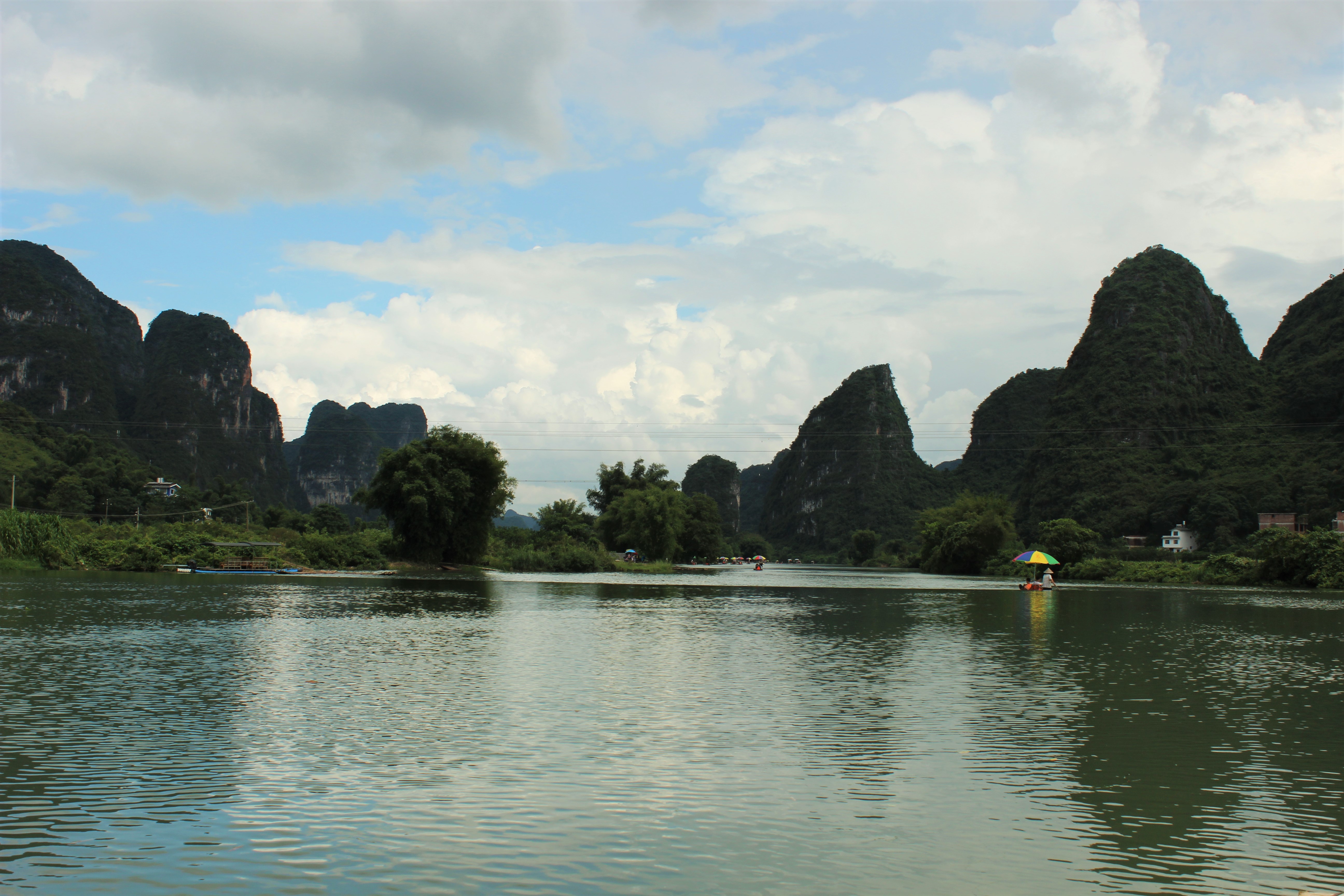
<li> 桂林阳朔 <br><img src="/image/IMG_9820.JPG" alt="阳朔遇流河"></li>
<li> 韶关骑行 <br><img src="/image/IMG_1136.JPG" alt="韶关 - 广东最美省道"></li>
</ol>
<p> 这其中最大的乐趣有二，一是吃喝，二是与爱的人一起。</p>
<ol>
<li> 深圳磨房百公里 （队友小强）</li>
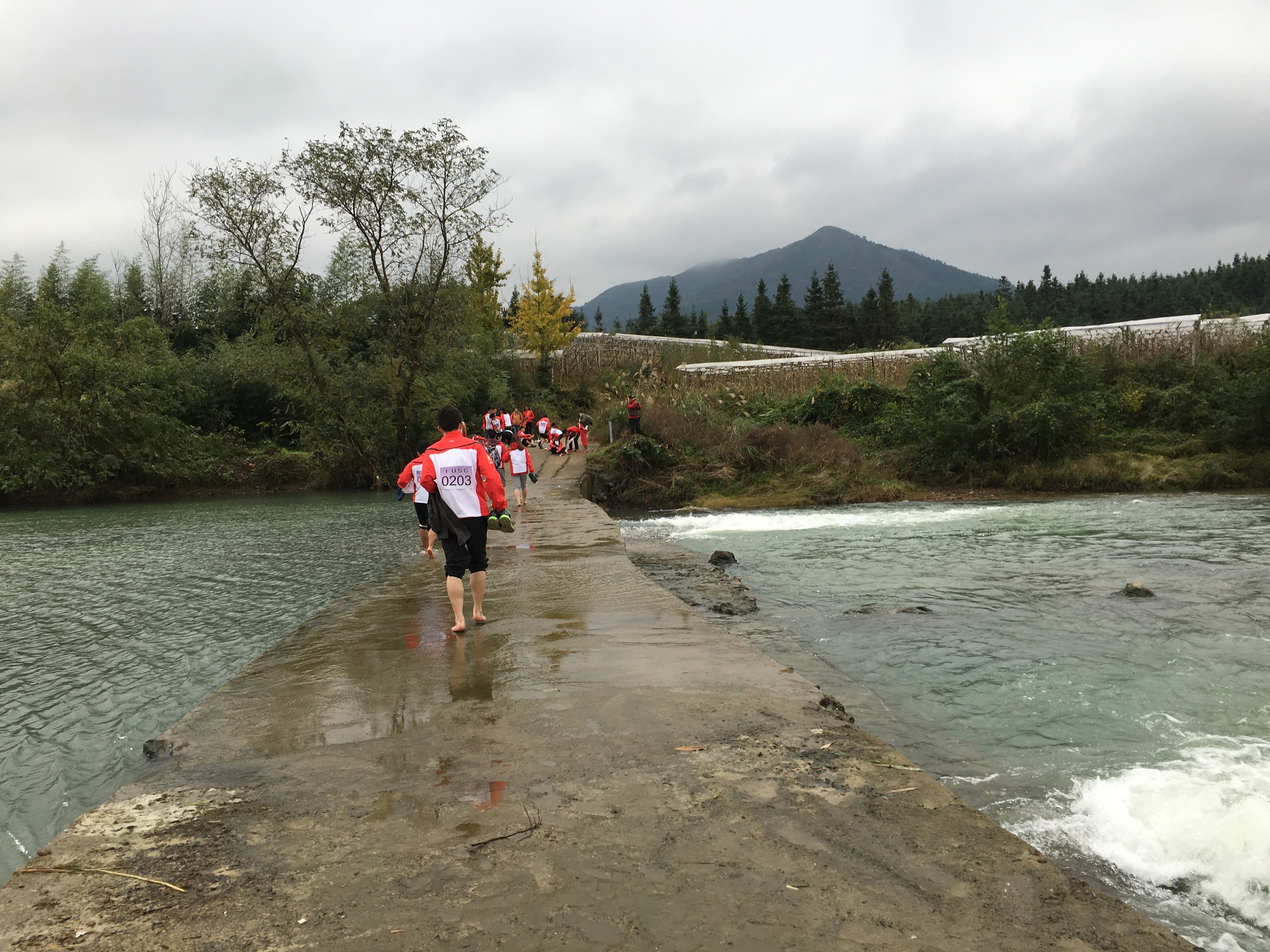
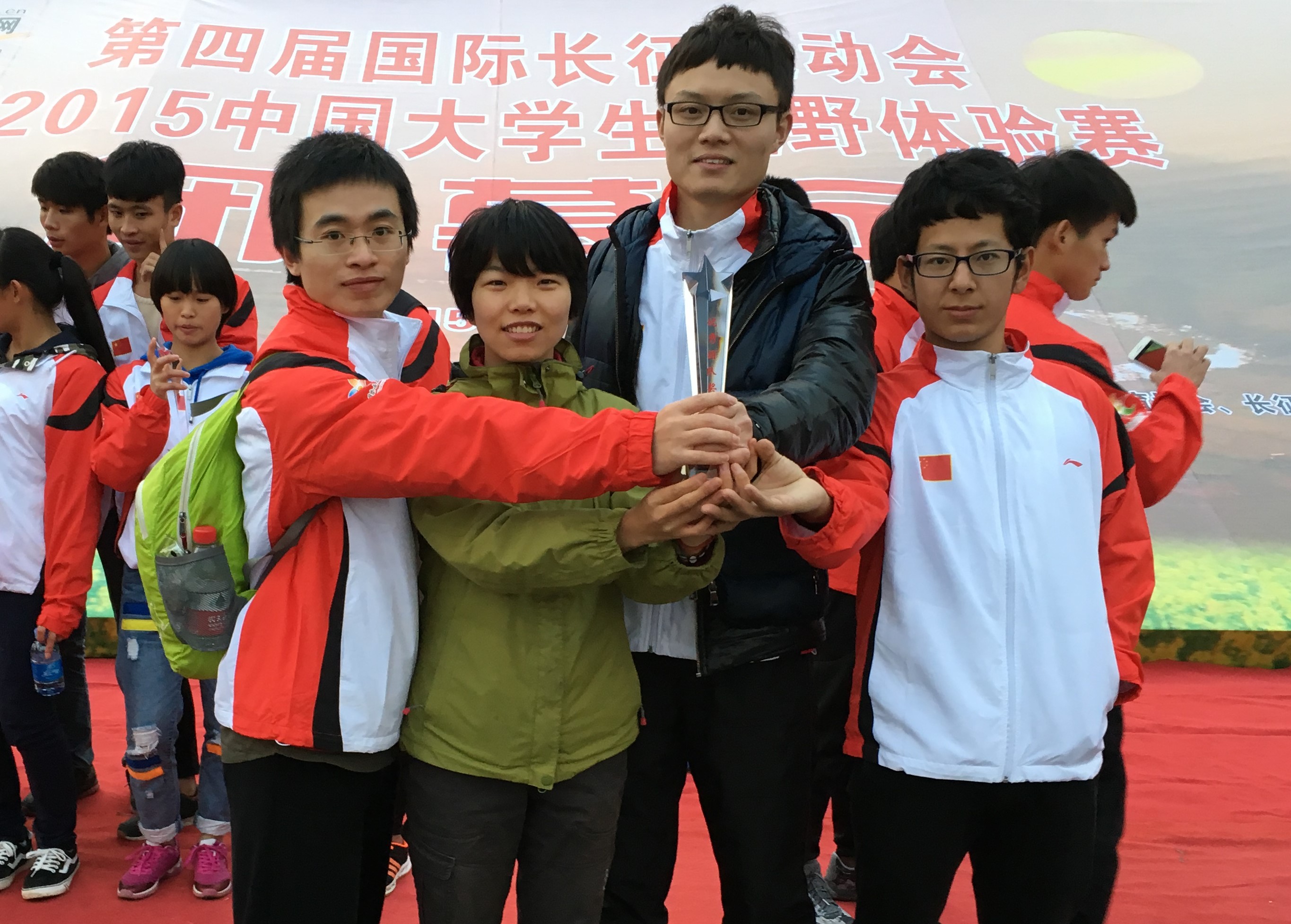
<li> 桂林兴安越野体验赛 （清华体育代表队，队友小红点，何润林，王林觉）<br><img src="/image/20151125_020915029_iOS.jpg" alt="兴安越野"><br><img src="/image/20151125_092209031_iOS.jpg" alt="越野赛队友"></li>
</ol>
<h2 id="2015 年的事">2015 年的事 </h2>
<h3 id="无关紧要的事"> 无关紧要的事 </h3>
<p> 我以后再也不要发不重要的论文。即使是认真做出来的，不够牛逼，就不要发。浪费生命的事情，你为什么要做呢？</p>
<h3 id="没有做好的事"> 没有做好的事 </h3>
<ol>
<li> 用好 Apple Watch，让健身圆环充满。这跟健身房停业休整关系最大。</li>
<li> 每天与女朋友沟通感情。</li>
<li> 回家见父母。</li>
<li> 每周与实验室师弟师妹 sync 进度，给导师汇报。</li>
<li> 每天吃早饭 </li>
</ol>
<h3 id="做的不错的事"> 做的不错的事 </h3>
<ol>
<li> 与自己和谐相处 </li>
<li> 宽以待人 </li>
<li> 关心投资 </li>
</ol>
<h3 id="不好不坏的事"> 不好不坏的事 </h3>
<ol>
<li> 要关心朋友 </li>
<li> 不要成为段子手 </li>
<li> 不要加班太多 </li>
</ol>
<h3 id="反常的事"> 反常的事 </h3>
<p> 没有踏出国门一步 </p>
<h2 id="你好，2016"> 你好，2016</h2>
<p> 如果一定要展望一下下，就奉上对博士学位的思考吧：<br> 明年我若不 quit，就做一个更加优秀的 PhD candidate，对得起导师的支持。<br> 我若 quit，就做一个优秀的工业界 researcher，对得起青春年华。</p>
<blockquote>
<p><em> 哈哈哈哈，仿佛很严肃的样子 </em></p>
</blockquote>
<p><strong> 如果觉得对你有启发，打赏一下吧！</strong><br><img src="/image/IMG_1179.JPG" alt=""></p>
]]></content>
    <summary type="html">
    <![CDATA[<blockquote>
<p><em>Isn’t it funny how day by day nothing change but when you look back, everything is different?</em> by <em>The Big Bang Theory</em></p>
</blockquote>
<p>太阳升起的时候，我常常想起林清玄的《与时间赛跑》。</p>
<blockquote>
<p>时间过得飞快，使我的小心眼里不只是着急，还有悲伤。</p>
</blockquote>
<h2 id="生活的方式">生活的方式</h2>
<p>对于2015年，我设想过很多种情形。最终走了其中的一种，当然和设想的也是有很大的不同，主要是惊喜。<br>]]>
    
    </summary>
    
  </entry>
  
  <entry>
    <title><![CDATA[粤北骑行]]></title>
    <link href="http://qinhongwei.com/2015/11/16/riding-in-north-Guangdong/"/>
    <id>http://qinhongwei.com/2015/11/16/riding-in-north-Guangdong/</id>
    <published>2015-11-16T15:29:39.000Z</published>
    <updated>2016-06-16T15:45:21.000Z</updated>
    <content type="html"><![CDATA[<p>国庆长假去广东北部骑行，路线从韶关到广州。</p>
<h2 id="计划">计划</h2>
<p>xhh 的车子放在了广州，我的车在深圳，为方便起见，我们先空身从深圳到广州，然后我在广州租一辆车。<br><a id="more"></a><br>国庆七天假，其实刨去北京往返深圳，以及在深圳见导师的时间，真正能用来骑车的只有四天。所以，我们计划带车上火车去韶关，然后从韶关骑回广州。</p>
<h2 id="出发">出发</h2>
<p>然而，十月二号一大早，在广州火车站拆车子进站被阻拦，然后紧赶慢赶找小红帽帮忙带进站还是被阻拦了下来。原计划泡汤，便从广州火车站旁边的汽车站出发。汽车一般比较灵活，好好说话，出点行李费就可以带上车。最后，算是损失了 90 块的小红帽费用，以及车票之间的差价，当然还有 60 块的行李费，耽误了 3 个小时左右，费了好多口舌和力气。当然，车子也折腾的不轻。</p>
<h2 id="到韶关">到韶关</h2>
<p>从韶关汽车站出来，组装好车子，吃了午饭便出发了。韶关就是个大县城，城里有一条河，很宽。出了中心城区，一路都是学校，先是韶关中学，韶关大学，然后是韶关学院。我们每到一个学校便要与他们气派的校门合影。xhh 拿着她的土豪金 iPhone6s 不断地寻找大片儿的视角。</p>
<p>要出韶关市区的时候，太阳已经落山了，见一家捷安特自行车店，xhh 给她的小黄蜂充了气，我请小哥帮忙检查了下油刹。小哥很热心地劝告我们晚上在这附近住下，因为前面那个乡镇经济很落后，吃住都不太方便。这附近临近韶关大学，夜市和住宿极为便利。然而，我们还是想按计划多走一点路。</p>
<p>前方没多远就有一段大上坡，不过可以从旁边的缓坡绕过去，就到了乡镇。这个乡镇比预想的还要落后啊，转了一圈发现既没有吃的也没有住的（除了一家招待所看起来极为破旧）。于是我们还是打道回府，决定回到市区住下。然而这个决定意味着我们要翻过来时避开的大上坡。后面的故事太累了。。。</p>
<p>下坡还是很爽的，到市区找了家 80 块的大观园旅馆，好像是附属于韶关大学的。条件其实还不错。外面的夜市倒是很不错，大排档很多，评价也很好。出来玩嘛，主要就是吃吃吃。</p>
<h2 id="在路上">在路上</h2>
<h3 id="骑行是翻山越岭">骑行是翻山越岭</h3>
<p>第二天的骑行都挺顺利，唯独下午走的路在修，烟尘特别严重。水库的风景很好，xhh 看着朋友圈的人山人海，发了一张水库的大片儿。<br>后面的路就习惯了，每天都是早上出发翻过一座山，下午到达另一个县城或者镇上。上坡就会很慢，有时候还要推着走。下坡如风驰电掣，然而要不断地捏刹车，手腕倒也挺累，总之就是感觉非常不划算，好不容易爬了这么一座大山，最后一会儿就下完了。</p>
<h3 id="骑行是看看世界">骑行是看看世界</h3>
<p>这几天骑行的路线被称为广东省最美省道。沿途的风景的确很美，最多的竹林，就像笑傲江湖里的那种竹林。我之前在四川和广西见到过竹林，但都没有这次这么多。也见到竹子被人砍去，用卡车运走，但是漫山遍野的竹林恐怕永远也砍不完吧。</p>
<p>路过村子的时候，就会有金黄的水稻，我第一次零距离地接触水稻，也是第一次看到这么美的稻田。香蕉树、椰子树是最常见的 <strong> 看家树 </strong>，我把一户户人家家门口种的树称为<strong> 看家树 </strong>，就像北方的桃树。<br> 沿途，我们路过了一个佛手瓜村，沿途全是佛手瓜。是一种藤蔓植物，有点像葫芦，像植物大战僵尸里的窝瓜。整个村子都以佛手瓜为生。<br>最后一天，从一个县城做大巴回广州的时候，沿途看到了火龙果树，这是我第一次看到火龙果树，很像菠萝树，像植物大战僵尸里的萝卜伞。<br>一路上有很多奇奇怪怪的植物。还路过一个泉眼，里面流出的水可以直接饮用，非常清冽，比买的农夫山泉好喝。据开车到那里打水的当地人说，是把水管插到了石缝里，水就从水管流了出来。</p>
<h3 id="山水是大自然的馈赠">山水是大自然的馈赠</h3>
<p>靠山吃山，靠水吃水。这些天，我有一个领悟。山才是普遍存在的东西，而像我的出生地广袤的华北平原是一种稀缺的地形。<br>有山的地方，便会有河流，有山谷，河流的下游冲击出平坦地带，便可以生存，于是有了人、村子和城镇。<br>城镇之间要交换资源，便要开路。到了现代，连接大城市的是高速公路、铁路，连接小城镇和村庄的便是蜿蜒蛇形的国道、省道、县道和乡道。现代化的道路取代了山路，然而大自然定下的大格局其实从来没有变过。数以百万计的年代中，一座座山并未改变多少位置。人类其实是在这个大格局下做一些修修补补，是在接受大自然的馈赠。<br>在古代，中原是富庶的，中原文化是灿烂的。因为平原地带，人走的多了就能成为路。物物交换，资源共享，非常有利于人类的自然繁衍。从这个角度看，是现代化，带来了山区的繁荣。</p>
<h3 id="粤北">粤北</h3>
<p>广东在全国人的印象中，是孔雀东南飞的目的地。大家看到的多是沿海港口城市的繁华。我对广东的文化和历史了解不多，更多是以游客的身份走马观花。广东与广西、湖南、福建相邻。在汕头，我们去南澳岛玩耍，南澳曾属于福建。粤北与湖南相接。爸爸去哪儿里出现过一集，地点是湖南的土楼。在韶关，我们看见一座围楼，与土楼的结构十分相似。</p>
<h2 id="走遍中国">走遍中国</h2>
<p>骑行只是一种方式。中国有极其丰富的地形、文化、风景，值得慢慢去感受。</p>
]]></content>
    <summary type="html">
    <![CDATA[<p>国庆长假去广东北部骑行，路线从韶关到广州。</p>
<h2 id="计划">计划</h2>
<p>xhh的车子放在了广州，我的车在深圳，为方便起见，我们先空身从深圳到广州，然后我在广州租一辆车。<br>]]>
    
    </summary>
    
      <category term="outdoor" scheme="http://qinhongwei.com/tags/outdoor/"/>
    
  </entry>
  
  <entry>
    <title><![CDATA[Tricks that brought me happiness today]]></title>
    <link href="http://qinhongwei.com/2015/11/15/tricks/"/>
    <id>http://qinhongwei.com/2015/11/15/tricks/</id>
    <published>2015-11-15T06:06:39.000Z</published>
    <updated>2016-07-19T08:57:06.000Z</updated>
    <content type="html"><![CDATA[<h2 id="Vim">Vim</h2>
<h4 id="Spell_check">Spell check</h4>
<p>use <code>:set spell</code> for checking spell errors.<br>use <code>:set nospell</code> for closing.</p>
<h4 id="Programming_Syntastic_check">Programming Syntastic check</h4>
<ul>
<li>Install Syntastic addon.</li>
<li>Then use <code>:SyntasticInfo</code> to check the checkers.</li>
<li>Take <code>matlab</code> code for example:<br>add <code>mlint</code> to <code>Path</code> (or system link to <code>/usr/local/bin/</code>)</li>
<li>use <code>:Errors</code> (<code>:lopen</code>) to check; <code>:w</code> to auto check.</li>
<li>Enjoy coding.</li>
</ul>
<h2 id="Un-block_Google_Scholar_for_DigitalOcean_vps">Un-block Google Scholar for DigitalOcean vps</h2>
<p>DigitalOcean’s ipv4 addresses are blocked by Google Scholar. We can solve this with ipv6.<br>To make it work:</p>
<ul>
<li>Enable ipv6 support in DigitalOcean online setting;</li>
<li>SSH vps, add Google Scholar ipv6 addresses in <code>/etc/hosts</code>:</li>
</ul>
<figure class="highlight"><table><tr><td class="gutter"><pre><div class="line">1</div><div class="line">2</div><div class="line">3</div><div class="line">4</div></pre></td><td class="code"><pre><div class="line">2607<span class="pseudo">:f8b0</span><span class="pseudo">:4007</span><span class="pseudo">:805</span><span class="pseudo">::100f</span> <span class="tag">scholar</span><span class="class">.google</span><span class="class">.cn</span></div><div class="line">2607<span class="pseudo">:f8b0</span><span class="pseudo">:4007</span><span class="pseudo">:805</span><span class="pseudo">::100f</span> <span class="tag">scholar</span><span class="class">.google</span><span class="class">.com</span></div><div class="line">2607<span class="pseudo">:f8b0</span><span class="pseudo">:4007</span><span class="pseudo">:805</span><span class="pseudo">::100f</span> <span class="tag">scholar</span><span class="class">.google</span><span class="class">.com</span><span class="class">.hk</span></div><div class="line">2607<span class="pseudo">:f8b0</span><span class="pseudo">:4007</span><span class="pseudo">:805</span><span class="pseudo">::100f</span> <span class="tag">scholar</span><span class="class">.l</span><span class="class">.google</span><span class="class">.com</span></div></pre></td></tr></table></figure>

<ul>
<li>In vps, restart shadowsocks:</li>
</ul>
<figure class="highlight"><table><tr><td class="gutter"><pre><div class="line">1</div><div class="line">2</div></pre></td><td class="code"><pre><div class="line"><span class="built_in">sudo</span> ssserver -c /etc/shadowsocks.json <span class="operator">-d</span> stop</div><div class="line"><span class="built_in">sudo</span> ssserver -c /etc/shadowsocks.json <span class="operator">-d</span> start</div></pre></td></tr></table></figure>

<ul>
<li>update on Jul. 18, 2016. If Google Search is blocked, you may want to add two more lines in <code>/etc/hosts</code>:</li>
</ul>
<figure class="highlight"><table><tr><td class="gutter"><pre><div class="line">1</div><div class="line">2</div></pre></td><td class="code"><pre><div class="line">2607<span class="pseudo">:f8b0</span><span class="pseudo">:4005</span><span class="pseudo">:801</span><span class="pseudo">::200e</span> <span class="tag">google</span><span class="class">.com</span></div><div class="line">2607<span class="pseudo">:f8b0</span><span class="pseudo">:4005</span><span class="pseudo">:801</span><span class="pseudo">::200e</span> <span class="tag">www</span><span class="class">.google</span><span class="class">.com</span></div></pre></td></tr></table></figure>

<ul>
<li>Enjoy.<br><strong> 如果觉得帮到了你，打赏一下吧！</strong><br><img src="/image/IMG_1179.JPG" alt=""></li>
</ul>
]]></content>
    <summary type="html">
    <![CDATA[<h2 id="Vim">Vim</h2>
<h4 id="Spell_check">Spell check</h4>
<p>use <code>:set spell</code> for checking spell errors.<br>use <code>:set nosp]]>
    </summary>
    
      <category term="tricks" scheme="http://qinhongwei.com/tags/tricks/"/>
    
  </entry>
  
  <entry>
    <title><![CDATA[Miss]]></title>
    <link href="http://qinhongwei.com/2015/08/25/Miss/"/>
    <id>http://qinhongwei.com/2015/08/25/Miss/</id>
    <published>2015-08-25T05:32:00.000Z</published>
    <updated>2016-06-16T15:45:21.000Z</updated>
    <content type="html"><![CDATA[<p>她不在 <br> 置身千万人之中 <br> 孤独袭来</p>
]]></content>
    <summary type="html">
    <![CDATA[<p>她不在 <br> 置身千万人之中 <br> 孤独袭来</p>
]]>
    </summary>
    
  </entry>
  
  <entry>
    <title><![CDATA[北京北京]]></title>
    <link href="http://qinhongwei.com/2015/08/08/Beijing-Beijing/"/>
    <id>http://qinhongwei.com/2015/08/08/Beijing-Beijing/</id>
    <published>2015-08-08T14:37:35.000Z</published>
    <updated>2016-06-16T15:45:21.000Z</updated>
    <content type="html"><![CDATA[<p> 今天说说五道口。<br> 有一回骑行妙峰山，回来的路上，看到交通标志牌，有一个方向指向“北京市区”。当时我们应该是已经进了石景山区了，所以看到北京市区还是觉得有点奇怪。同行的小悦悦笑了：北京市区是东城区西城区这些地方啊，这地方只能算北京郊区。我们也笑了，圆明园地处北京西北郊，而清华园就在圆明园边上，自然也是北京郊区了。<br> 清华的东门出去，是五道口。这个地方二十年前据说还是一片农田。所以，李健写过一首歌《风吹麦浪》，就是他在清华的宿舍楼里发呆的时候，看窗外的麦浪而作。<br> 然而，中关村一夜之间就成了中国的 IT 中心，信息时代把中关村带上了不亚于深圳的发展速度。<br> 五道口对于大清的学生，是校外的娱乐中心，娱乐主要是吃。各种各样的主题是吃在五道口的帖子屡见不鲜了。</p>
<h4 id="宇宙中心"> 宇宙中心 </h4>
<p> 五道口被戏称为宇宙中心，我搞不清楚这个称呼存在于清华学生口中，还是五道口人们口中，还是整个北京。我旁敲侧击地做过测试，司机师傅对把五道口称为宇宙中心并不感到奇怪。这个绰号怎么来的呢？据我猜测有多种可能：</p>
<blockquote>
<ol>
<li> 五道口拥堵程度是宇宙中最高的；</li>
<li> 五道口购物中心，即华联大厦，英文名字叫 Uni-Center，大大的标志在楼顶，遥遥可见；</li>
<li> 五道口韩国人多，韩国人认为整个宇宙中，他们是中心。</li>
</ol>
</blockquote>
<h4 id="我在五道口"> 我在五道口 </h4>
<p> 在清华学习，在科技园搬砖，整个生活都是在五道口转的。<br> 每天必过的繁忙路口，每天必吃的五道口美食。到了 6 点半左右，下班时间，从东往西走是很困难的，因为你会觉得自己在巨大的人流中“逆行”。各种各样的人，都是年轻人，女性居多，因为男工程师还在加班吧，我猜。<br> 走在这样的人流里，我就消失在人流里。有一回经过赛乐堡，汪峰的北京北京在空中飘扬。要是再来一首存在，气氛就恰到好处了。<br> 最近两个月在五道口，我有两大爱好，必须要在五道口完成，一是健身，一是看电影。绝大部分时候都是一个人，所以我有充分的时间发呆。刚才在健身房，我突然想：</p>
<blockquote>
<p> 我在川流不息的人群中死去，又在健身房重生。</p>
</blockquote>
<p> 这句话容不得品，因为它俗不可耐。健身房本就是都市生活和健康需求的折衷。所以你不能在健身房重生，要在一个豪迈的地方重生，比如山巅。<br> 五道口的美食我吃过的却并不多，因为我觉得吃东西很麻烦，必须要有人带我。所以我一个人吃饭是一点也不美好的事情。可是并没有人陪我……<br> 煎饼侠里有个镜头给的是搜狐大厦，我在健身房又看到搜狐大厦。有时候我觉得离张学长很近，有时候很远。<br> 五道口啊，五道口。</p>
]]></content>
    <summary type="html">
    <![CDATA[<p> 今天说说五道口。<br> 有一回骑行妙峰山，回来的路上，看到交通标志牌，有一个方向指向“北京市区”。当时我们应该是已经进了石景山区了，所以看到北京市区还是觉得有点奇怪。同行的小悦悦笑了：北京市区是东城区西城区这些地方啊，这地方只能算北京郊区。我们也笑了，圆明园地处北京西北]]>
    </summary>
    
  </entry>
  
</feed>